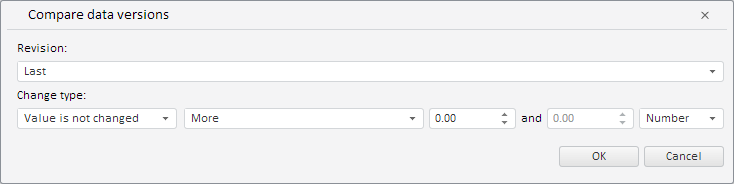
To execute the example, the HTML page must contain the WorkbookBox component named workbookBox (see Example of Creating the WorkbookBox Component). Create the RevisionComparisonDialog component and show it in the wiorkbook:
// Get the Data tab on the workbook tool ribbon
var dataCategory = workbookBox.getRibbonView().getDataCategory();
// Determine callback function
var onRequestMetadata = function (sender, args) {
    dataCategory.RequestMetadata.fire(dataCategory, args);
};
// Create a dialog of data validation rule by comparing their versions
var revisionComparisonDialog = new PP.TS.Ui.RevisionComparisonDialog({
    // Specify key of the resource for displaying a dialog title
    ResourceKey: "TSRibbonVersionDataComparisonDialog",
    // Specify a handler for the event of metadata request in component
    RequestMetadata: new PP.Delegate(this.onRequestMetadata, dataCategory),
    Width: 734, // Dialog width
    Height: 184 // Dialog height
});
// Display this dialog
revisionComparisonDialog.show();
After executing the example the RevisionComparisonDialog component was created and displayed:
See also: