To execute the example, the HTML page must contain the WorkbookBox component named workbookBox (see Example of Creating the WorkbookBox Component). Create the PeriodSeriesViewItem component and show it in the workbook:
// Get workbook properties panel
var propertyBar = workbookBox.getPropertyBarView();
// Get time series control wizard
var pswPanel = propertyBar.getPeriodSeriesViewPanel();
// Create the Series panel
var periodSeriesViewItem = new PP.TS.Ui.PeriodSeriesViewItem({
    Source: workbookBox.getSource(), // Data source
    ViewType: PP.Ui.NavigationItem, // Create a navigation bar
    Title: "Series", //
    OwnerMaster: propertyBar,
    // Process a series list loading event
    RootLoaded: function () {
        console.log("Loading data series...");
    },
    // Process data layout position change events
    DerivedVisibleChanged: function () {
        console.log("Time series layout position is changed");
    }
});
// Create the created panel to the workbook properties panel
propertyBar.addMasterPanel(periodSeriesViewItem);
// Expand the Series panel
periodSeriesViewItem.expand();
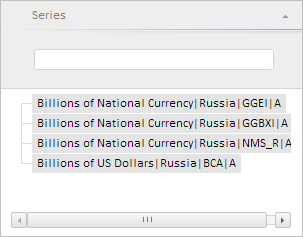
After executing the example the PeriodSeriesViewItem component was created and displayed:
The RootLoaded event was fired on component creation. Handler of this event shows an appropriate notice in the browser console:
Loading data series...
See also: