getChangeColumnsSettings (wbk, columns);
wbk. Sets workbook value.
columns. Sets columns.
The getChangeColumnsSettings method returns body of a request to edit workbook columns.
To execute the example, the page must contain the WorkbookBox component named workbookBox (see Example of Creating the WorkbookBox Component), and the following code must be added in the document opening event handler:
	var changeColumnsSettingsButt = new PP.Ui.Button({
		ParentNode: document.body, //DOM parent node
		Content: "Change Column Parameters", //text
		Click: PP.Delegate(onClickgetChangeColumnsSettings)
	});

	function onClickgetChangeColumnsSettings()
	{
		var source = workbookBox.getSource();//Return an instance of the PP.TS.WbkDocument class
		var columns = wbk.getWbkMetadata().columns;
		//Change text in the column header
		columns.its.it[0].customTitle = 'Column changed';
		//Change workbook columns
		var body = tsService.getChangeColumnsSettings(wbk, columns);
		wbk.setIsChanged(True);
		tsService._invokeRemoteProc(wbk, body, PP.Delegate(onColumnsChanged, this));

		//changeColumns function execution end event handler
		function onColumnsChanged(sender, args){
			//Refresh the workbookBox component
			workbookBox.refreshAll();
		}
	}
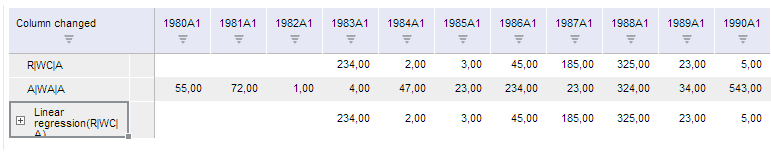
After executing the example a button named Change Column Parameters is placed in HTML page. Clicking this button sets the Column Changed header for the column with the index 0.
See also: