changeColumns (wbk, columns, callback);
wbk. Sets workbook value.
columns. Sets columns.
callback. Sets operation completion handler.
The changeColumns method changes workbook columns.
To execute the example, the page must contain the WorkbookBox component named workbookBox (see Example of Creating the WorkbookBox Component), and also add the following code in the handler, that processes document opening event:
	var changeColumnsButt = new PP.Ui.Button({
		ParentNode: document.body, //DOM parent node
		Content: "Change Column", //text
		Click: PP.Delegate(onClickChangeColumnsButt)
		});

	function onClickChangeColumnsButt()
	{
		var source = workbookBox.getSource();//Return an instance of the PP.TS.WbkDocument class
		var columns = wbk.getWbkMetadata().columns;
		//Change text on the column header
		columns.its.it[0].customTitle = 'Column changed';
		//Change workbook columns
		tsService.changeColumns(wbk, columns, PP.Delegate(onColumnsChanged, this));
		//changeColumns function end event handler
		function onColumnsChanged(sender, args){
			//Refresh the workbookBox component
			workbookBox.refreshAll();
		}
	}
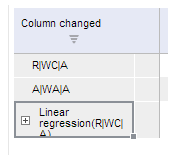
After executing the example a button named Change Column is placed in the HTML page. On clicking this button heading of the workbook table column is changed to Column Changed:
See also: