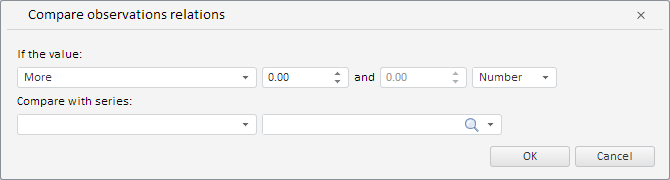
PP.TS.Ui.RatioWizard(settings: Object);
settings. JSON object that contains values of class properties.
The RatioWizard constructor creates an instance of the RatioWizard class.
To execute the example, the HTML page must contain the WorkbookBox component named workbookBox (see Example of Creating the WorkbookBox Component). Create a wizard that validates data by comparing observations ratio and place it in a dialog box:
/* Create a data validation wizard
   by comparing observation relations */
var ratioWizard = new PP.TS.Ui.RatioWizard({
    Source: workbookBox.getSource() // Data source
});
// Get DOM tree for this wizard
var dom = ratioWizard.getDomNode();
// Set wizard style
PP.addClass(dom, "PPValidationSettingsDlgContent");
// Add the created wizard to the dialog
var dialog = new PP.Ui.Dialog({
    Caption: "Observation relation comparison", // Dialog title
    Content: ratioWizard, // Dialog contents
    Width: 670, // Dialog width
    Height: 180 // Dialog height
});
// Display this dialog
dialog.show();
After executing the example a wizard that validates data by comparing observations ratio is created and placed it in a dialog box:
See also: