PP.Rds.Ui.SchemaDialog(settings: Object);
settings. Class settings.
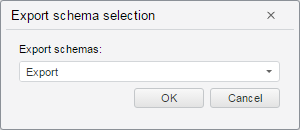
The SchemaDialog constructor creates a dialog box used to select export/import schema.
To execute this example, the page must contain the DictionaryBox component named dictionaryBox (see. Example of creating the DictionaryBox component ). Create a dialog used to select import schema:
// Create a dialog box used to select import schema
var schemaDialog = new PP.Rds.Ui.SchemaDialog({
    Source: dictionaryBox.getSource()[0],
    IsImport: true, // Dialog box for import schemas
    Canceled: function (sender, args) {
        // Delete this dialog box
        sender.dispose();
    },
    Confirmed: function (sender, args) {
        // Output identifier of the selected import schema
        alert("Import schema identifier: " + args.Schema.k);
        // Delete this dialog box
        sender.dispose();
    }
});
// Display a new dialog box
schemaDialog.showDialog();
After executing the example a dialog box used to select export/import schema is created:
Clicking the OK button fires the Confirmed event, the console displays identifier of the selected import schema.
Clicking the Cancel button fires the Canceled event, and the dialog closes.
See also: