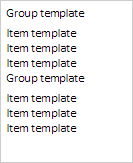
Executing the example requires links to PP.js scenario file and PP.css styles file in the <body> tag of HTML page of the <div> element with the LongListBox identifier. In the "onload" event of the <body> tag it is necessary to call the createLongListBox() function. Add grouped list to the document:
var longListBox;
function createLongListBox() {
    // Create grouped list
    longListBox = new PP.Ui.LongListBox({
        // Set parent element
        ParentNode: document.getElementById("longListBox"),
        // Specify dimensions
        Width: 120,
        Height: 150,
        // Set height of group elements of the list
        GroupsHeight: 20,
        // Set height of regular elements of the list
        ItemsHeight: 15,
        // Set template for elements of the list
        ItemsTemplate: "Element template",
        // Set template for group elements of the list
        GroupsTemplate: "Group template",
        // Set several groups with elements
        Groups: [{ Items: [{}, {}, {}] }, { Items: [{}, {}, {}] }]
    });
}
As a result grouped list appears: