refreshView(args: Object|PP.Mb.Ui.PropertyChangedEventArgs);
args. Settings of speedometer container.
The refreshView method refreshes speedometer container in accordance with specified settings.
Executing the example requires that the HTML page contains the GaugeBox component named gaugeBox (see Example of Creating the GaugeBox Component). Draw the speedometer container background to light blue:
if (gaugeBox.isLoaded()) {
    // Handle the Refreshed event
    gaugeBox.Refreshed.add(function (sender, args) {
        console.log("Speedometer container is refreshed");
    });
    // Get container settings
    var state = gaugeBox.getState();
    var metadata = [];
    for (i in state.getMetadata()) {
        var option = state.getMetadata()[i];
        // Set light-blue fill color for container background
        if (option.Name == "gaugeMaster.speedometerPanel.fillPanel.color") {
            option.Value = PP.Color.Colors.lightblue;
            metadata.push(option);
        }
    };
    // Determine an object with changed settings
    var args = new PP.Ui.PropertyChangedEventArgs({
        PropertyName: 'GaugeSettings',
            Metadata: metadata
    });
    // Refresh speedometer container
    gaugeBox.refreshView(args);
} else {
    console.log("Speedometer container is not loaded.");
};
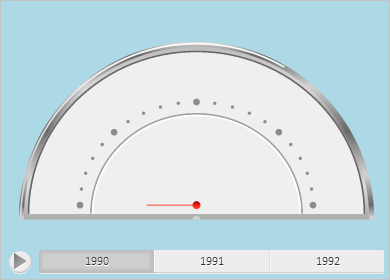
After executing the example background of speedometer container is filled with light blue color:
The browser console displays a notice that the speedometer container is refreshed.
See also: