To execute the example, create an HTML page and perform the following operations:
1. Add links to the following CSS files: PP.css.
Also add links to the following JS files: PP.js, PP.Metabase.js, PP.Express.js, PP.GraphicsBase.js, PP.Charts.js, PP.GaugeMaster.js, PP.Util.js.
2. Also specify style for the elements:
<style type="text/css">
body, html {
    height: 100%;
    width: 100%;
}
</style>
3. Add a script that creates a container with speedometer. The repository must include an express report with the 4397 key:
<script type="text/javascript">
    var gaugeBox; // Speedometer container
    function Ready() {
        var IMAGE_PATH = "../build/img/"; // Path to the icons folder
        // Create a repository connection
        var metabase = new PP.Mb.Metabase({
            PPServiceUrl: "PPService.axd?action=proxy",
            Id: "prognozplatform201408",
            UserCreds: {
                UserName: "sa",
                Password: "sqlserver"
            }
        });
        // Open repository connection
        metabase.open();
        // Create a service used to work with speedometer
        var eaxMdService = new PP.Exp.EaxMdService({
            Metabase: metabase
        });
        // Edit document with the 54306 key
        eaxAnalyzer = eaxMdService.edit(54306);
        // Create a speedometer container
        gaugeBox = new PP.Exp.Ui.GaugeBox({
            Source: eaxAnalyzer, // Container data source
            ParentNode: document.body,
            Service: eaxMdService, // Service for working with container
            ImagePath: IMAGE_PATH, // Path to the icons folder
            RequestMetadata: function(sender, args) {
                console.log("Metadata request");
            }
        });
    }
</script>
4. In the <body> tag specify name of the function that loads speedometer container as value of the onLoad attribute:
<body onload="Ready()">
</body>
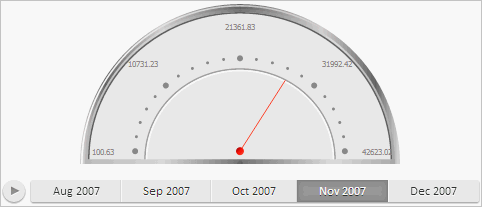
After executing the example the HTML page contains the GaugeBox component with a speedometer:
After executing the example a message on metadata request is displayed in the browser console.
See also: