
 To open the Data group of parameters
To set up aggregation of several values of table area fixed dimension elements, use the Data group of parameters on the side panel:
To open the Data group of parameters
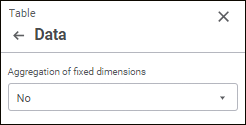
Set the parameters:
Aggregation of Fixed Dimensions
If in a table:
Selected elements contain identifiers of different measurement units.
Structure of the dimension that includes these elements corresponds to structure of indicators dictionary.
A cube contains a units dictionary and the Do not Aggregate Different Measurement Units checkbox is selected.
During aggregation of fixed dimensions:
The Dimensions area displays the  icons and a tooltip next to the dimension with these elements.
The calculated cell will display the "-" character instead of the value. To change the character or text, use the IPivot.UnmatchedUnitsText property. To display the character or text during aggregation of fixed dimensions, the dimension should be located in fixed.
When displaying of icons for calculated cells is enabled, the calculated cell will display both characters. The =- characters are displayed by default.
See also:
 Parameters button on the toolbar.