Refresh entire report. Execute one of the operations:
Click the
 Refresh button on the Home ribbon tab.
Select the Refresh All Sheets item in the drop-down menu of the
Refresh button on the Home toolbar tab.Press F9. It is available during report editing.
Refresh sheet. Select the Refresh Sheet item in the drop-down menu of the Refresh button on the Home toolbar tab.
Reopen data sources. Select the Reopen Data Sources item in the drop-down menu of the Refresh button on the Home toolbar tab. When data sources are reopened, cache of sources and their nested objects is cleared.
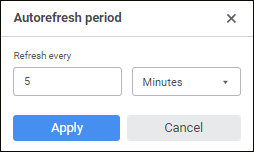
Automatically refresh entire regular report. Click the  Automatic Refresh button on the Home toolbar tab to set up report automatic refresh.

 To periodically refresh data