 ,
,XIrr(Values, DateTimes[, Guess])
Values. The range of cells that contains values of cash flows corresponding to payment schedule given in the DateTimes parameter. The first payment is optional and corresponds to the starting investment payment. All subsequent payments are discounted based on the 365-day year. The sequence of values must contain at least one positive cash flow and one negative cash flow.
DateTimes. The range of cells containing payment dates schedule corresponding to series of cash flows. The first date is the starting one in the payment schedule. All other dates must be later than this date, but they can follow in random order.
NOTE. The number of values specified for the Values parameter and the DateTimes parameter must match.
Guess. Expected value of the XIrr function result. This parameter is optional. The default value: 0.1. In most cases it is not needed to set this parameter.
NOTE. To determine the parameter, specify either the parameter value or the cell address where it is located.
It returns the internal rate of return for a schedule of cash flows that are optionally periodic.
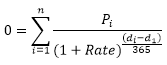
The iteration method is used to calculate XIrr. Using the changing rate, starting from the Guess parameter value, the XIrr function makes cyclic calculations until it gets a result with precision to 0.000001 percent. If the XIrr function fails to find the result after 100 attempts, it returns an error. The rate changes until the following equality:
,
where:
di. Date of the i-th or the last payment.
d1. Date of the zero or first payment.
Pi. Sum of thei-th or last payment.
Rate. Rate.
| Formula | Result | Description |
| =XIrr(A0:E0, A1:E1,0.09) | 2086,65 | The internal rate of return for the series of cash flows specified within the A0:E0 range. Payment date schedule is given within the A1:E1 cell range. The A0:E0 range includes the following values: -10.000, 2.750, 4.250, 3.250, 2.750. The A0:E0 range includes the following values: 01.01.2008, 01.03.2008, 03.10.2008, 15.02.2009, 01.04.2009. |
See also:
Function Wizard │ Financial Functions │ Irr │ MIrr