 ,
,Npv(Rate, Values)
Rate. The rate of discount over the length of one period.
Values. The range of cells that contain income and payment values.
NOTE. To determine the parameter, specify either the parameter value or the cell address where it is located.
It returns the net present value of an investment based on a discount rate and a series of future payments (negative values) and income (positive values).
The Values parameter values must be evenly distributed over the time, and the payments should be made at the end of each period. The Npv function uses order of the Values parameter values to define the order of incomes and payments. Make sure to enter the payment and income values in the sequence you want.
It is considered that an investment, which value is calculated by the Npv function, starts one period before the first monetary payment of Values and ends with the last payment in the list. The calculations of the Npv function are based on future payments. If the first cash flow occurs at the beginning of the first period, the first value must be added to the Npv result, not included in the value arguments.
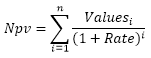
The function is calculated according to the following formula:
,
where:
n. The number of values in the Values parameter.
| Formula | Result | Description |
| =Npv(0.15, A0:C0) | 3,68 | The net present value of investment based on the discount rate 0.15 and the value of future payments and incomes specified in the A0:C0 cell range. The A0:C0 cell range contains the following values: -0.1, 1.5, 4. |
| =Npv(B6, A0:C0) | 3,06 | The net present value of investment based on the discount rate specified in the B6 cell and the value of future payments and incomes specified in the A0:C0 cell range. The A0:C0 cell range contains the following values: 0.1, 1.5, 4. The B6 cell contains the 0.23 value. |
See also:
Function Wizard │ Financial Functions │ Pv │ Xnpv