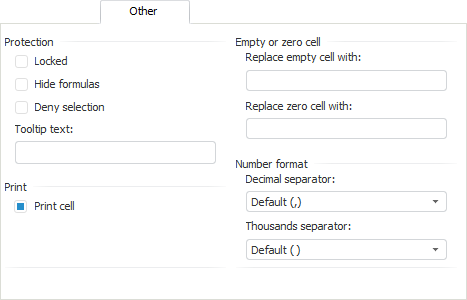
The Other tab looks as follows:
NOTE. This tab may be short (may not include some groups of parameters) depending on how the formatting dialog box has been opened.
The Protection section includes the following settings:
Locked. When the checkbox is selected, cell contents is protected from editing.
Hide Formulas. When the checkbox is selected, contents of the formula containing cells is hidden and cannot be edited. Data obtained as a result of formula calculation should be displayed in the cell.
Deny Selection. When the checkbox is selected, the cell becomes unselectable on opening the report in the view mode. The context menu for this cell will not open. On an attempt to select the cell denied for selection, the focus remains on the previously selected cell till the next cell available for selection is selected. One can move by allowed cells in the table using the keyboard. When the cell range with unselectable cells is selected, all unselectable cells remain unselected.
Tooltip Text. Enter tooltip text for locked cell.
The Print section controls printing of cell contents. When the Print Cell checkbox is deselected, the cell contents is not printed. Text, hyperlinks, and background color or pattern are not exported. This checkbox is selected for all cells by default.
The Empty or Zero Cell group determines text contents for cells with empty or zero values.
NOTE. Replacement of empty and zero cells depends on access permissions to data contained in cells. Access permissions are determined using authorization objects or cube segments. Full access to data is used by default. If the ITabCellStyle.AccessRights property returns TabAccessRights.NoAccess or TabAccessRights.Write, replacement of empty and zero cells will be unavailable.
The Number Format group contains:
Decimal Separator. It sets view of decimal separator on showing values in cells.
Thousands Separator. It sets view of thousands separator on showing values in cells.
See also:
Working with Formatting Dialog Box