The configuration that includes the balancer located between the web servers cluster and the web application:
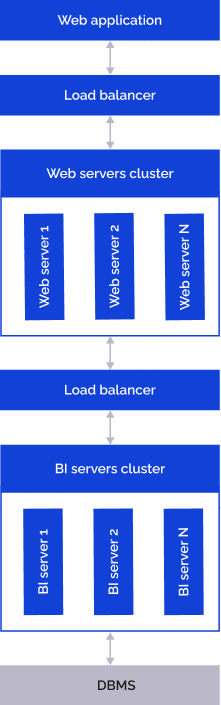
Determine the settings for the HAProxy balancer:
Add the string in the backend bk_bi section of the /etc/haproxy/haproxy.conf file:
backend bk_bi #Name of group of BI servers.
...
http-request add-header userhostaddress %[src]
...
Determine the settings for the nginx balancer:
Comment the strings in the location directive of the balancer:
proxy_set_header X-Real-IP $remote_addr;
proxy_set_header X-Forwarded-For $proxy_add_x_forwarded_for;
Add the string instead of them:
proxy_set_header userhostaddress $proxy_add_x_forwarded_for;
On web servers in the configuration file:
/etc/apache2/apache2.conf for Debian-based distributions.
/etc/httpd/conf/httpd.conf for RedHat-based distributions.
/etc/httpd2/conf/httpd2.conf for ALT Linux.
Comment the strings:
SetEnvIf REMOTE_ADDR "^(.+)$" USER_CLIENT_ADDR=$1
RequestHeader merge userhostaddress "%{USER_CLIENT_ADDR}e"
The configuration that does not include the balancer located between the web servers cluster and the web application:
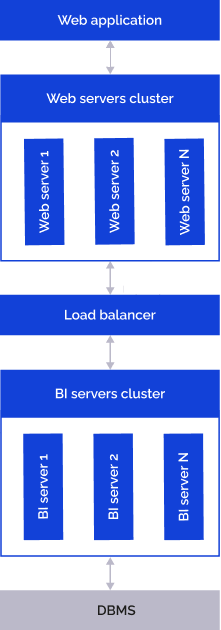
On web servers in the configuration file:
/etc/apache2/apache2.conf for Debian-based distributions.
/etc/httpd/conf/httpd.conf for RedHat-based distributions.
/etc/httpd2/conf/httpd2.conf for ALT Linux.
Check if the following strings are present:
SetEnvIf REMOTE_ADDR "^(.+)$" USER_CLIENT_ADDR=$1
RequestHeader merge userhostaddress "%{USER_CLIENT_ADDR}e"