DataAdapter: Object;
The DataAdapter property determines a data source that determines the hatching.
Executing the example requires a form with the following components: the Button component named Button1, the MapBox component named MapBox1, and the UiMap component named UiMap1. UiMap1 is a data source for MapBox1. A map should be connected to the UiMap1 component. The VisualDataAdapter class that creates a dynamic data source should also be implemented. The class example is contained in the IMapVisual.DataAdapter property description.
The example is a handler of the OnClick event for the Button1 component.
Add links to the Drawing, ExtCtrls, Forms, and Map system assemblies.
Sub Button1OnClick(Sender: Object; Args: IMouseEventArgs);
Var
Map: IMap;
Layer: IMapLayer;
AreaVisual: IMapAreaVisual;
Fill: IMapVisualFillProperty;
Color: IMapVisualColorProperty;
Scale: IMapFillScale;
Begin
Map := UiMap1.Map;
Layer := Map.Layers.FindByName("Regions");
AreaVisual := Layer.Visuals.AddAreaVisual;
AreaVisual.DataAdapter := New VisualDataAdapter.Create As IMapDynamicDataAdapter;
Fill := AreaVisual.Fill;
Fill.DataAdapter := AreaVisual.DataAdapter;
Scale := Fill.Scale;
Scale.Count := 1;
Scale.AutoCalculable := True;
Scale.Fill(0, MapScaleSettingImpact.Greater) := GxHatchStyle.Cross;
Scale.Fill(0, MapScaleSettingImpact.Less) := GxHatchStyle.DarkUpwardDiagonal;
Fill.Dependent := True;
Color := AreaVisual.FillColor;
Color.Values.Count := 1;
Color.Values.Item(0) := GxColor.FromName("Blue");
Map.Refresh;
End Sub Button1OnClick;
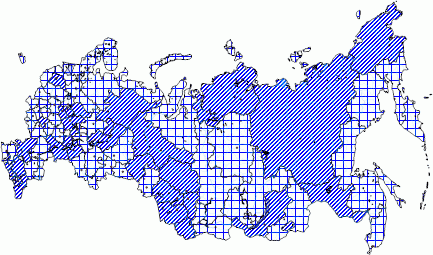
After executing the example the map indicator, which is hatched in blue, and is determined by the scale, is added to the Regions layer. The data source, that determines the hatching, matches with the indicator data source:
See also: