CellStyle(CellType: LnCellType): ILanerCellStyle;
CellType. Cell type.
The CellStyle property returns formatting style of data table cells. The type of the cells, which formatting style needs to be obtained, is set by the CellType parameter.
NOTE. The property returns the formatting style for any cell type, except for the LnCellType.Normal.
Executing the example requires a form with the following components: the Button component named Button1, the TabSheetBox component named TabSheetBox1, and the UiErAnalyzer component named UiErAnalyzer1. UiErAnalyzer1 is a data source for TabSheetBox1. A working area of the time series database that contains the spliced series should be loaded to UiErAnalyzer1.
The example is a handler of the OnClick event for the Button1 component.
Add links to the Drawing, Express, ExtCtrls, Forms, Laner, and Tab system assemblies.
Sub Button1OnClick(Sender: Object; Args: IMouseEventArgs);
Var
ErAnalyzer: IEaxAnalyzer;
Laner: ILaner;
Style: ILanerCellStyle;
Grid: IEaxGrid;
Begin
ErAnalyzer := UiErAnalyzer1.ErAnalyzer;
Laner := ErAnalyzer.Laner;
Style := Laner.CellStyle(LnCellType.Splice);
// Changing font color for red
Style.FontColor := GxColor.FromName("Red");
// Changing cells background color for orange
Style.BackgroundColor := GxColor.FromName("Orange");
// Changing font for Arial
Style.Font := New GxFont.Create("Arial", 8);
Grid := ErAnalyzer.Grid;
Grid.Refresh;
End Sub Button1OnClick;
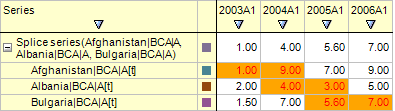
After executing the example, formatting for series cells that are the child ones for the output spliced series is changed:
See also: