SizeVisual: IVZNumericVisual;
The SizeVisual property determines visualizer used to set size of tree map child items.
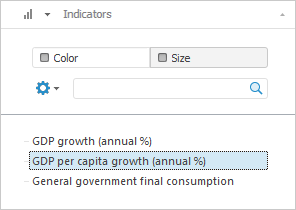
Executing the example requires that the repository contains an express report with the EXP identifier. To enable the visualizer to set size of map tree child elements, open this express report and go to the Selection tab on the side panel. Next, open the metrics dimension tab and click the Size button, select one of the items available in the list:
The unit containing the example should have links to the Express, Metabase and Visualizators system assemblies. The specified procedure should be called from the Main entry point.
Transform a set of numbers by the custom transformer that is used to increase the input value as much as 20 times:
// Determine custom data transformer
Class MyAdapter: object, IVZDataAdapter
// Input value is to be increased 20-fold
Function GetData(Value: Variant): Variant;
Begin
Return Value * 20
End Function GetData;
End Class MyAdapter;
Sub UserProc;
Var
Metabase: IMetabase;
EaxAnalyzer: IEaxAnalyzer;
TreeMap: IVZTreeMap;
SizeVisual: IVZNumericVisual;
DataSourceMapping: IVZDataSourceMapping;
DataTransformer: IVZDataAdapter;
Begin
// Get the current repository
Metabase := MetabaseClass.Active;
// Get express report
EaxAnalyzer := Metabase.ItemById("EXP").Edit As IEaxAnalyzer;
// Get tree map
TreeMap := EaxAnalyzer.TreeMap.TreeMap;
// Get chart element size visualizer
SizeVisual := TreeMap.SizeVisual;
// Get settings for data mapping
DataSourceMapping := SizeVisual.NumericMapping;
// Set the Data Transformer mapping type
DataSourceMapping.MappingType := VisualizatorDataMappingType.DataMappingTransformer;
// Create and set custom data transformer
DataTransformer := New MyAdapter.Create;
DataSourceMapping.DataTransformer := DataTransformer As IVZDataAdapter;
Debug.WriteLine("Data transformation:");
Debug.IndentLevel := 1;
Debug.WriteLine("Input: -0.05, output: " +
((DataTransformer.GetData(-0.05)) As Double).ToString);
Debug.WriteLine("Input: 0, output: " +
((DataTransformer.GetData(0)) As Double).ToString);
Debug.WriteLine("Input: 0.05, output: " +
((DataTransformer.GetData(0.05)) As Double).ToString);
Debug.WriteLine("Input: 5, output: " +
((DataTransformer.GetData(5)) As Double).ToString);
Debug.WriteLine("Input: 1000, output: " +
((DataTransformer.GetData(1000)) As Double).ToString);
// Set visualizer used to determine bubble tree element size
TreeMap.SizeVisual := SizeVisual;
End Sub UserProc;
After executing the example, the custom transformer is created used to increase output value as much as 20 times, the development environment console window shows results of number transformation: -0.05, 0, 0.05, 5 and 1000:
Data transformation:
Input: -0.05, ouput: -1
Input: 0, output: 0
Input: 0.05, output: 1
Input: 5, output: 100
Input: 1000, output: 20000
See also: