DimCalculateStyle(DimKey: Integer; CalculatedElement: Integer): ITabCellStyle;
DimKey. Key of the dimension with created calculated indicators.
CalculatedElement. Unique identifier of calculated indicator.
The DimCalculateStyle property determines a formatting style for the cells containing calculated indicators.
Unique identifier of calculated indicator is obtained in the IPivotEvaluatorDimCalculatesItem.CalculatedElement property.
Executing the example requires a form with the Button1 button, the UiErAnalyzer component named UiErAnalyzer1 and the TabSheetBox component that is used to display data.
Sub Button1OnClick(Sender: Object; Args: IMouseEventArgs);
Var
OLAP: IEaxAnalyzer;
Grid: IEaxGrid;
Pivot: IPivot;
Sel: IDimSelection;
Totals: IPivotEvaluatorTotals;
Dim: IDimInstance;
Calcs: IPivotEvaluatorDimCalculates;
Calc: IPivotEvaluatorDimCalculatesItem;
TStyle: IEaxTableStyle;
CellStyle, HeaderStyle: ITabCellStyle;
i, i1: Integer;
Begin
OLAP := UiErAnalyzer1.Instance As IEaxAnalyzer;
Grid := OLAP.Grid;
Pivot := OLAP.Pivot;
//Totals
Totals := Pivot.Evaluator.Totals;
Totals.RowTypes := PivotEvaluatorElementType.Sum;
//Calculated indicator - Percentage to total
Dim := Pivot.TopHeader.Dim(0);
Calcs := Pivot.Evaluator.DimCalculates;
Calc := Calcs.FindByDimKey(Dim.Key);
Sel := Pivot.Selection.FindByKey(Dim.Key);
i := Calc.AddPercentCalculate("Percentage to total", Sel.Element(0), DimRelation.Last, PivotEvaluatorTotalDisposition.Overall, PivotEvaluatorElementType.Sum);
i1 := Calc.AddPercentCalculate("Percentage to subtotal", Sel.Element(0), DimRelation.Last, PivotEvaluatorTotalDisposition.Sub_, PivotEvaluatorElementType.Sum);
//Formatting style of calculated indicators
CellStyle := New TabCellStyle.Create;
CellStyle.BackgroundColor := GxColor.FromName("Coral");
CellStyle.Font.Bold := TriState.OnOption;
CellStyle.CustomFormat := "0,00%";
//Formatting style of calculated indicator headers
HeaderStyle := New TabCellStyle.Create;
HeaderStyle.BackgroundColor := GxColor.FromName("Red");
//Set styles
TStyle := Grid.Style;
TStyle.DimCalculateStyle(Dim.Key, Calc.CalculatedElement(i)) := CellStyle;
TStyle.DimCalculateStyle(Dim.Key, Calc.CalculatedElement(i1)) := CellStyle;
TStyle.DimCalculateHeaderStyle(Dim.Key, Calc.CalculatedElement(i)) := HeaderStyle;
TStyle.DimCalculateHeaderStyle(Dim.Key, Calc.CalculatedElement(i1)) := HeaderStyle;
Grid.Refresh;
End Sub Button1OnClick;
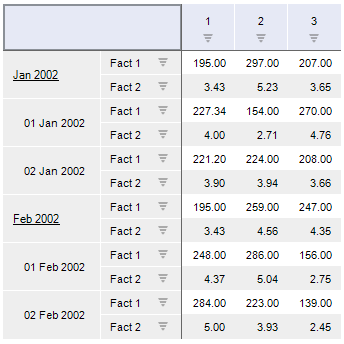
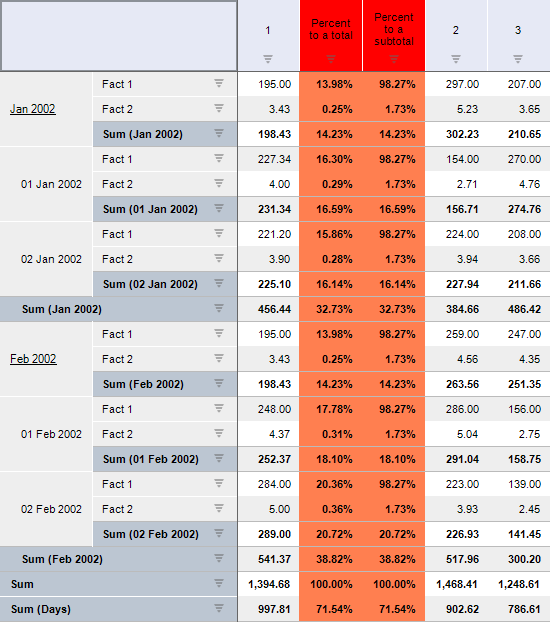
The totals counting is enabled, when clicking the button for express report loaded to UiErAnalyzer1. Sum of values is calculated by rows. Subtotals values will also be calculated. The system will create two calculated indicators that execute calculations on the basis of the first column values. The first calculated indicator calculates percentage of values to general totals, the second one calculates percentage of subtotals. Display format is set for calculated indicators.
See also: