getTableAnalysisButtonAngle();
The getTableAnalysisButtonAngle method returns the Rotate Table button on the workbook ribbon.
This method returns an object of the PP.Ui.RibbonButton type.
To execute the example, the HTML page must contain the WorkbookBox component named workbookBox (see Example of Creating the WorkbookBox Component). Go to the Table ribbon tab of the workbook. Rename the Rotate Table and Layout buttons:
// Get ribbon
var ribbon = workbookBox.getRibbonView();
// Get the Table tab
var tableCatView = ribbon.getTableCategory();
// Get the Rotate Table and Layout buttons
var angleButton = tableCatView.getTableAnalysisButtonAngle();
var layoutButton = tableCatView.getTableAnalysisButtonLayout();
// Determine new name for both buttons
angleButton.setContent("Transpose");
layoutButton.setContent("Show Titles");
// Refresh the Table tab
tableCatView.refresh();
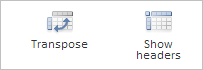
After executing the example names of the Rotate Table and Layout buttons are changed to Transpose and Show Titles respectively:
See also: