EnableEdit: Boolean
The EnableEdit property determines whether title can be edited.
Available values:
true. Title editing is enabled (default).
false. Title editing is disabled.
Use JSON or the setEnableEdit method to set the property value, and the getEnableEdit method to get the property value.
To execute the example, the HTML page must contain the ExpressBox component named expressBox (see Example of Creating the ExpressBox Component). To show the title, click the Title button on the Home tab. Check if the edit mode is enabled and enable title editing and also set handlers of the EditModeChanged and TextSelectionChanged events:
// Get title
var title = expressBox.getDataView().getTitleView();
// Check if edit mode is enabled
if (title.getEditMode()) {
    console.log("Edit mode is enabled");
} else {
    console.log("Edit mode is disabled");
}
// Set a handler of the EditModeChanged event
title.EditModeChanged.add(function(sender, args) {
    console.log("Edit mode is changed");
});
// Set a handler of the TextSelectionChanged event
title.TextSelectionChanged.addfunction(sender, args) {
    console.log("Title editor text is changed");
});
// Enable title editing
title.setEnableEdit(True);
The console displays check result:
Edit mode is disabled
Start edit mode and change title text editor height:
// Start edit mode
title.beginEdit();
// Change text editor height
title.getTextEditor().setHeight(20);
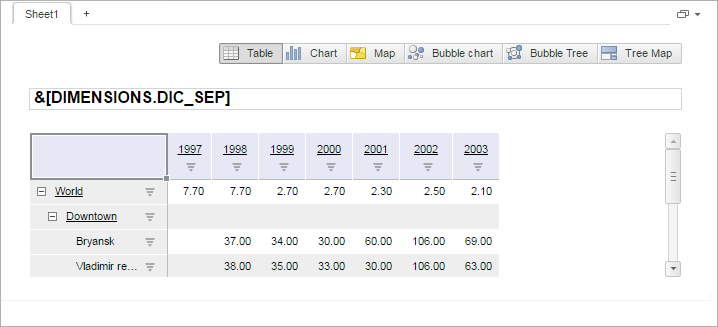
As a result title editing is enabled:
The console displays information about change in edit mode:
Edit mode is changed
After editor text is changed the console displays information about the change:
Title editor text is changed
Disable title edit mode:
// Disable edit mode
title.endEdit();
See also: