draw3d(scale: Number, pointZoom: PP.Point, offsetLeft: Number, offsetTop: Number);
scale. Map scale.
pointZoom. Zooming point.
offsetLeft. Offset from the layer left edge.
offsetTop. Offset from the layer right edge.
The draw3d method draws a milestone of 3D map layer area.
To execute the example the HTML page must contain the MapChart component named map (see Example of Creating the MapChart Component). A map with the WebGL topobase must also be loaded (see the page with description of the MapChart.TopoNormalization property).
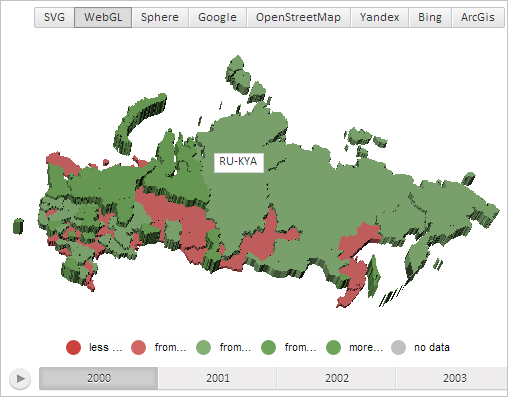
Create a milestone containing text area and place it in the center of 3D map layer area with the RU-KYA identifier:
// Create a text area
var textArea = new PP.Ui.TextArea({
    Width: 50,
    Height: 20,
    Content: "RU-KYA" // Text
})
// Create a milestone for map layer area with the RU-KYA identifier
var milestone = new PP.MapContentMilestone({
    Chart: map,
    Content: textArea, // Milestone contents - text area
    Shape: "{RU-KYA}"
});
with(milestone) {
    // Render a milestone
    draw3d(map.getScale(), null, 0, 0);
    // Determine a milestone position taking into account the 50% offset
    var targetPoint = new PP.Point("0.5, 0.5");
    var point = getMilestonePosition3d(targetPoint)
    // Place the milestone in the center of the map layer area with the RU-KYA identifier
    setLeft(point.getX() - textArea.getWidth() / 2);
    setTop(point.getY());
};
After executing the example a milestone containing text area is displayed in the center of 3D map layer area with the RU-KYA identifier:
See also: