Enabled: Boolean
The Enabled property determines whether the border is shown.
Available Values:
true. Border is shown.
false. Border is not shown.
To execute the example, the HTML page must contain links to the jquery.js, PP.js scenario files, and the PP.css styles file. Add a text area to the document and set new style for this area:
// Create a text area
var textArea = new PP.Ui.TextArea({
    // Set area width
    Width: 200,
    // Set area height
    Height: 100,
    // Set area contents
    Content: "2013"
});
// Create a shadow
var shadow = new PP.Shadow({
    Color: new PP.Color("#ffef99")
});
// Set shadow angle
shadow.setAngle(45);
// Set difference in shadow size relative to object
shadow.setSize(10);
// Create a text area border
var border = new PP.Border({
    "Color": '#000000',
    "Width": 2,
    "Style": PP.BorderStyle.solid
});
// Create a text area style
var style = {
    Release: new PP.Style({
        // Set solid fill brush
        Background: new PP.SolidColorBrush({
            Color: PP.Color.Colors.lightblue
        }),
        // Set bold italic font style
        Font: new PP.Font({
            IsBold: True,
            IsItalic: True
        }),
        // Set border
        Border: border,
        // Set shadow
        Shadow: shadow
    })
};
// Set style
textArea.setStyle(style);
// Add this area to document
textArea.addToNode(document.body);
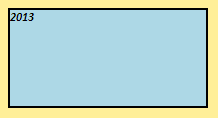
After executing the example a text area with bold italic font style, shadow and fill color is created in the document. Black solid line 2 pixels wide is set for text area border:
Then hide the border and refresh text area style:
// Hide border
border.setEnabled(False);
// Refresh text area style
textArea.setStyle(style);
After executing the example text area border is hidden:

See also: