Create the HTML page and perform the following steps to execute an example:
1. Add references to the following JS and CSS files in the HEAD tag:
PP.js.
PP.css.
PP.App.css.
PP.Metabase.css.
PP.Report.css.
PP.Metabase.js.
PP.Report.js.
PP.App.js.
2. Add the following script in the SCRIPT tag:
<script type="text/javascript">
    var prxReport, reportBox, prxMbService;
    function renderReport() {
       PP.ImagePath = "../build/img/";
       PP.ScriptPath = "../build/"; // path to builds
       PP.CSSPath = "../build/";
       PP.resourceManager.setRootResourcesFolder("../resources/"); //path to resources folder
       PP.resourceManager.setResourceList(['PP', 'Metabase', 'Regular', 'VisualizerMaster']);
       PP.setCurrentCulture(PP.Cultures.ru); //language settings for resources
       var waiter = new PP.Ui.Waiter(); //establish repository connection
       metabase = new PP.Mb.Metabase({
           PPServiceUrl: "PPService.axd",
           Id: "WAREHOUSE",
           UserCreds: { UserName: "user", Password: "password" },
          //the Waiter component is displayed at the beginning of the repository request
           StartRequest: function () {
               waiter.show();
           },
           //the Waiter component is hidden after repository request is finished
           EndRequest: function () {
               waiter.hide();
               //all requests are deleted from cache after request is finished
               metabase.clearCache();
           },
        //in case of error, error message is displayed
        Error: function (sender, args) {
            alert(args.ResponseText);
        }
      });
     metabase.open(); //open repository
     prxMbService = new PP.Prx.PrxMdService({ Metabase: metabase }); //create a service for working with regular reports
     prxReport = prxMbService.open(3275); // open regular report by key;
     var imgPath = "../build/img/"; // path to icons folder
     // create the ReportBox component
     reportBox = new PP.Prx.Ui.ReportBox({
         Source: prxReport,
         Service: prxMbService,
         ParentNode:document.body,
         ImagePath: imgPath,
     });
    };
</script>
NOTE. The ReportBox component with subscriptions to events of the Report main menu is implemented by means of the PP.App.init component or the PP.Application.PrxModuleObject constructor.
Replace strings of ReportBox component creation in the script to use PP.App.init:
PP.App.init(PP.App.ModuleType.Reporter, { Metabase: {IsMbOpened: true}, Module: {
    Source : prxReport,
    Service : prxMbService,
    },
    ParentNode: document.body });
To use PP.App.PrxModuleObject:
var moduleObject = new PP.App.PrxModuleObject({"Source":prxReport, "Service": prxMbService, "ParentNode":document.body});
reportBox = moduleObject.getReportBox();
3. In the BODY tag add the following code:
<body  onload="renderReport()">
</body>
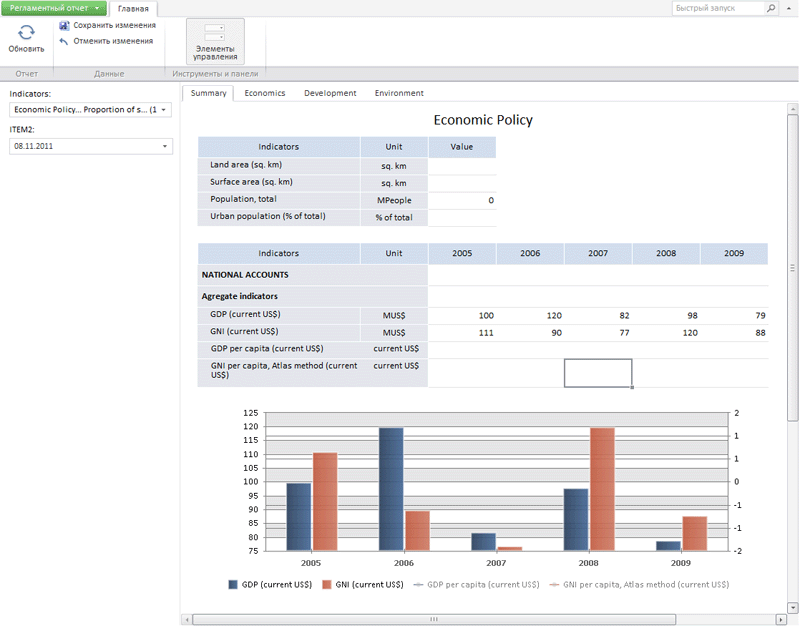
After executing the example a ReportBox that looks as follows is placed in the HTML page:
See also: