
 To open the dialog box
Changing selection by criterion is available in regular reports, information panels.
To change selection by criterion, use the Edit Selection dialog box.
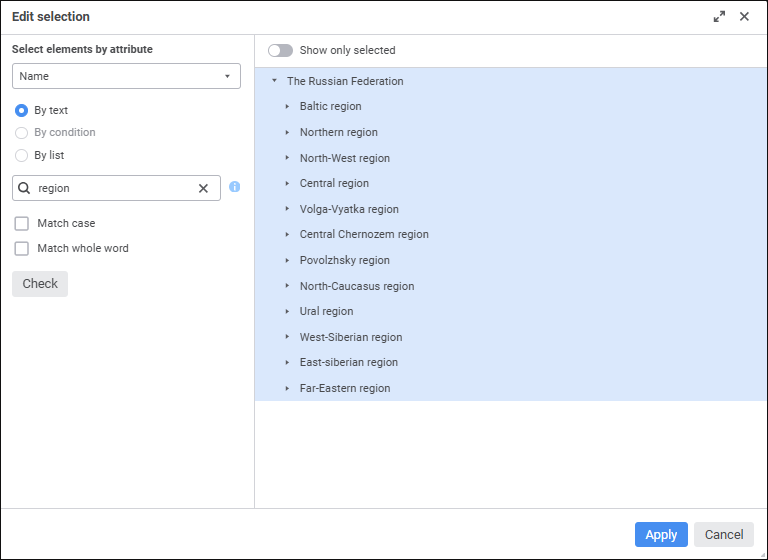
The selection area for the calendar dimension is named Select Elements by Attribute.
To change selection by criterion:
Select the attribute or level, for which criterion will be set. The default attribute is that is set as name. The calendar dimension is set to display the highest level by default, excluding the root level.
Select radio button of the required attribute to determine criterion type. The available criterion type depends on the selected attribute type:
By Text. It is available for string attribute type. In the search box enter the text containing attribute values of elements to be selected. One can search by the following substitutions:
%. It can be used with any character sequence.
_. It can be used with any single character.
Select the Match Case checkbox to make search case sensitive.
Select the Match Whole Word checkbox to search words that match exactly the entered text.
Equal.
Not Equal.
Greater Than. It is available for the types: Date and Time, Integer, Real, Date.
Greater Than or Equal. It is available for the types: Date and Time, Integer, Real, Date.
Less Than. It is available for the types: Date and Time, Integer, Real, Date.
Less Than or Equal. It is available for the types: Date and Time, Integer, Real, Date.
Between. It is available for the types: Date and Time, Integer, Real, Date.
Enter a value in the box or set a value range if the Between condition type is selected. Value editor will depend on attribute type. When logical type is selected, one can select between true and false.
By List. It is available for the String and Integer attribute types. In the box enter the list of attribute values, each list element must start with a new line. The list can be copied from clipboard. Elements are searched taking into account case and full match with the entered text.
Click the Check button to selected the elements matching the search criterion in the dimension element display area. To display only selected elements, toggle the Show Only Selected switch to active state. If only child elements are selected, they will be displayed with parent elements.
Click the Apply button to apply the new selection.
After executing the operations the dimension element selection is changed by the specified criterion.
See also:
Working with Dimension Elements | Selecting Dimension Elements