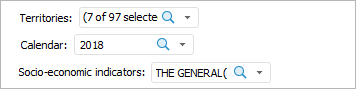
A control is an object that is used to manage data, shown report objects, enables the user to change selected dimension elements or report parameter.
Controls are set up in the edit mode and include the following operations:
On adding or editing controls, the Control side panel tab opens.
Working with interactive controls is identical to working with dimension elements. For details see the Working with Dimension Elements section.
See also:
Getting Started with the Reports Tool in the Web Application | Building Report

 Display the Controls panel
 Controls button located:
 . The panel is positioned horizontally at the top report border.
 . The panel is positioned vertically at the right report border.
 . The panel is positioned horizontally at the bottom report border.
 . The panel is positioned vertically at the left report border.
 . The Controls panel is not displayed.