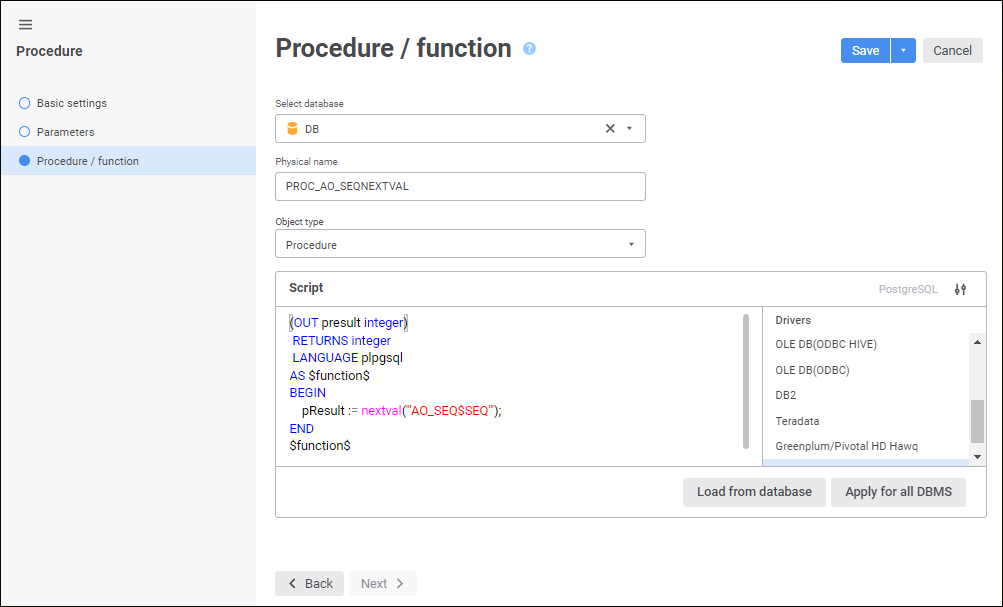
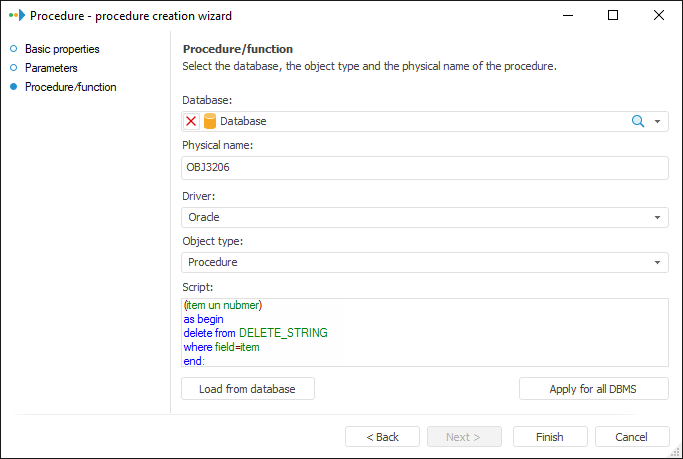
The Procedure/Function page is used to select a database, driver, object type and script.
Set the parameters:
Select Database/Database. Select database in the drop-down list of repository objects. The driver specified in settings of the selected database is set automatically on changing a database. The use of ClickHouse DBMS is available only in the web application.
To quickly select an object, enter object's name/identifier/key in the search box depending on display settings. Search is executed automatically while the searched text is entered into the search string. The list will display the objects, which names/identifiers/keys contain the entered text.
To set up displaying of repository objects, click the  Show Object button and select display option in the drop-down menu:
Name. Objects are displayed with their names. Default option.
Identifier. Objects are displayed with their identifiers.
Key. Objects are displayed with their keys.
Several options can be selected. Identifier and key will be specified in brackets.
To reset selection for selected objects, click the  Clear button.
Physical Name. Specify the physical object name (procedure or function), which is created on the DBMS server and which corresponds to the one created in the repository. It coincides with the identifier by default.
Object Type. Select created object type in the drop-down list:
Procedure.
Function.
Drivers/Driver. Select the driver type in the drop-down list. The default driver used by the selected database is shown in bold. If required, one can select another driver and determine the SQL query text for this driver. It is relevant if the repository will be used on servers with different DBMS and database settings in repository will be changed.
The ClickHouse driver is available only when the Function object type is selected.
To show or hide the driver list, use the Hide Driver List/Show Driver List button.
NOTE. Creating of procedures and functions is unavailable in SQLite DBMS because such object type is missing in this DBMS.
Script. Enter the header part, containing input and output parameters if required and procedure (function) body. Features of working with the field:
The script text should be written in the SQL language, which syntax depends on the selected DBMS.
The header part containing initialization code and physical name is generated automatically. They should not be specified in the script.
Create a parameter with the Function Result value for the function.
The description of parameters of the same type (input and output) should be in the same order as they are created on the Object Parameters page.
 Example of creating a function in Oracle DBMS
Example of creating a procedure in Oracle DBMS
NOTE. If the PostgreSQL driver is selected, the first string of the script should contain the list of parameters and it should be in one string.
Load from Database. The button is used to refresh procedure or function text from database. Clicking this button returns a request to confirm the operation. If the answer is Yes, procedure or function text will be refreshed from database.
Apply for All DBMS. The button enables the user to set the script text to all DBMS. Clicking this button returns a request to confirm the operation. Confirmation is required if at least one driver other than the current one, has non-empty query text.
See also:
