
 Microsoft SQL Server
To set up advanced database connection parameters, on the Database Properties page use the Advanced Settings drop-down list with parameters: The Advanced Settings drop-down list with parameters opens. Parameters depend on the selected DBMS client type used for database connection:

Set the parameters:
DBMS is Case Sensitive. Select the checkbox to work with objects and their fields in DBMS with different capitalization in their physical name. After the checkbox is selected, database objects will be available only if their exact physical names are specified. If the checkbox is deselected, physical names of objects and their fields in DBMS will be converted into lower case during platform addressing to the server. The parameter is used on granting permissions on DBMS level and is taken into account during database connection and operations with database.
IMPORTANT. The parameter is set once on the primary setup of database connection. If the parameter is changed again, it may result in data loss.

Set the parameters:
DBMS is Case Sensitive. Select the checkbox to work with objects and their fields in DBMS with different capitalization in their physical name. After the checkbox is selected, database objects will be available only if their exact physical names are specified. If the checkbox is deselected, physical names of objects and their fields in DBMS will be converted into lower case during platform addressing to the server. The parameter is used on granting permissions on DBMS level and is taken into account during database connection and operations with database.
IMPORTANT. The parameter is set once on the primary setup of database connection. If the parameter is changed again, it may result in data loss.
User Server Cursors. Server cursors are objects that can be used to extract data sequentially from query results without overloading memory. The checkbox is selected by default, and server cursors are used. When the checkbox is deselected, DBMS queries will not use server cursor.
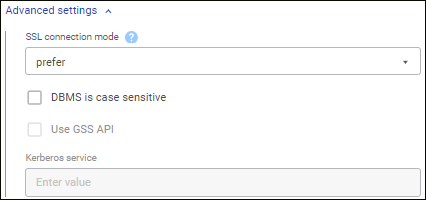
Set the parameters:
TLS Connection Mode. Select a mode of creating a protected DBMS connection in the drop-down list:
Disable. Connection without TLS use.
Allow. First, try to connect without use of TLS. If the connection failed, try to connect via TLS.
Prefer. First, try to connect via TLS. If the connection failed, try to connect without use of TLS.
Require. Try to connect only via TLS. If there is the root certificate, verify it in the same way as during the VerifyCA mode.
VerifyCA. Try to connect only via TLS. Check if DBMS server certificate is issued by trusted certification authority.
VerifyFull. Try to connect only via TLS. Check if DBMS server certificate is issued by trusted certification authority, and server name corresponds to name in the certificate.
DBMS is Case Sensitive. Select the checkbox to work with objects and their fields in DBMS with different capitalization in their physical name. After the checkbox is selected, database objects will be available only if their exact physical names are specified. If the checkbox is deselected, physical names of objects and their fields in DBMS will be converted into lower case during platform addressing to the server. The parameter is used on granting permissions on DBMS level and is taken into account during database connection and operations with database.
IMPORTANT. The parameter is set once on the primary setup of database connection. If the parameter is changed again, it may result in data loss.
User Server Cursors. Server cursors are objects that can be used to extract data sequentially from query results without overloading memory. The checkbox is selected by default, and server cursors are used. When the checkbox is deselected, DBMS queries will not use server cursor.
Use GSS API. When the checkbox is selected, PostgreSQL server authentication can be used by the GSS API mechanism. The checkbox is available if the Integrated Domain authentication type is selected on the Database Properties page:
Kerberos Service. The Kerberos service is used together with GSS API. GSS API enables the use of various Kerberos implementations without modifying application code. The Kerberos service name, that is determined in PostgreSQL server settings, must be specified in the box. For details about Kerberos API see the product's official website.
User Name with Domain. Indicates whether domain name is added to the user name during domain or integrated domain authentication. The checkbox is deselected by default, and only user name is sent when addressing the directory service or global directory during user authentication. If the checkbox is selected, user name will be sent with domain in the format: <name>@<domain> during the addressing.
See also: