A shortcut is a repository object that has own metadata, but its data is taken from the referenced object that is available in this repository or in the repository, with which a link is created:
To create a shortcut, select the New Object > Shortcut item in the Create group of the object navigator's main menu. The shortcut wizard opens:
The wizard contains the pages: Basic Properties and Shortcut.
Set basic properties on the Basic Properties page of the wizard:
Name. Enter shortcut name.
Identifier. Enter unique shortcut identifier. The identifier may consist of only Latin letters, numbers and underline character and should not start with a number.
NOTE. The box is optional. The text box to enter a shortcut comment.
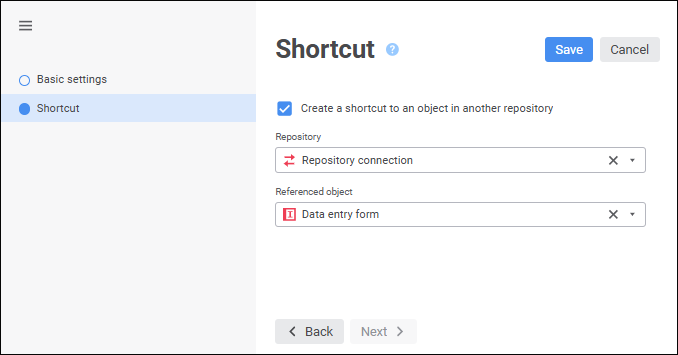
On the Shortcut wizard page determine an object, to which the shortcut refers:
Create a Shortcut to an Object in Another Repository. After this checkbox is selected, select an object of the Repository Connection type in the Repository drop-down list, which can be used to get access from the current repository to an object from another repository. After this select the object in the Source Object box.
Referenced Object. Select the object, to which the shortcut refers. The list shows all folders and objects of the current repository. If the object, to which the shortcut refers, is in another repository, in the Referenced Object drop-down menu specify the Repository Connection item as a root folder.
When creating a shortcut, parameters set in the source object are saved. The set of referenced object parameters can be changed after the shortcut is created. To make these changes to the shortcut, select the Synchronize with Referenced Object item in the shortcut's context menu. After synchronization, actual parameters will be added to the shortcut.
NOTE. The Synchronize with Referenced Object item is used only for the shortcut that is in the same repository as the referenced object.
To go to the object, to which the shortcut refers, select the Go to Referenced Object item in the shortcut's context menu.
NOTE. The Go to Referenced Object item is available only for the shortcut that is located in the same repository as the referenced object.
See also:
Creating Other Objects | Connecting to Another Repository