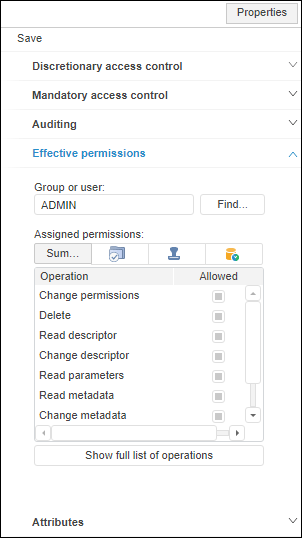
To view effective permissions as a summary table by access control methods, use the Effective Permissions tab on the Properties side panel:
NOTE. Viewing effective permissions is available only for the selected object if at least one access control method is used.
In the Group or User box specify a group or a specific user, whose permissions must be viewed. Enter user or user group names manually or using the Search Users and Groups dialog box that opens on clicking the Find button.
The Assigned Permissions table displays existing permissions of a user or a user group to execute specific operations on the selected object:
Operation. The list of available operations on the object, which checkboxes are selected, if an operation is allowed for a user or a user group according to access permissions.
Allowed/Summary. Operations allowed in all selected access control methods.
Discretionary Permissions. Allowed operations when discretionary access control is used.
Mandatory Permissions. Allowed operations when mandatory access control is used.
Security Levels. Allowed operations when security levels are used.
ABAC Permissions. Allowed operations when attribute-based access control is used.
Class Permissions. Allowed operations for a specific object type when discretionary access control is used.
NOTE. Columns are displayed depending on the selected access control methods.
If attribute-based access control is used simultaneously with discretionary access control, the use of the operation in the Allowed/Summary column depends on the selected permissions combination algorithm:
AND. The operation is allowed if the operation is allowed simultaneously for two access control methods. If the operation is denied for one of access control methods or access permissions are undefined, the operation is denied
OR. The operation is allowed if operation permission is set up for at least one of access control methods, and access permissions are undefined for the other access control method. If the operation is denied for one of access control methods, the operation is denied.
See also: