Virtualization environment can be used when preparing mobile platform server based on Ubuntu, Astra Linux, Rocky Linux. Foresight Mobile Platform supports Oracle VirtualBox, VMware Workstation and Microsoft Hyper-V.
Consider creating of a virtual machine on a local computer by means of Oracle VirtualBox 7.0.20.
To prepare virtualization environment:
Download the Ubuntu OS ISO image with 22.04 version.
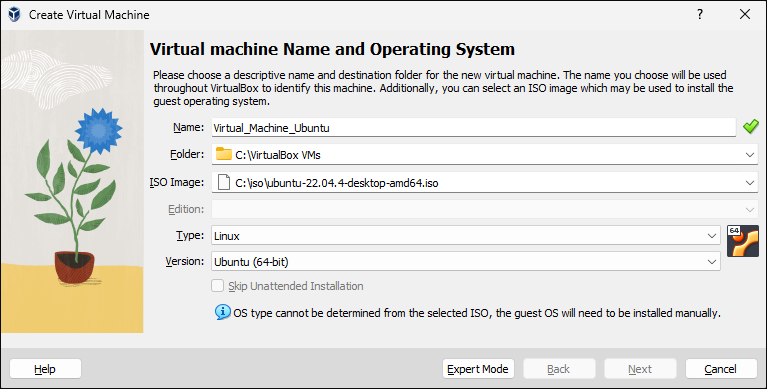
Create a virtual machine in Oracle VirtualBox using the Create Virtual Machine dialog box:
Set the parameters:
On the Virtual Machine Name and Operating System page:
Name. Enter custom name of the virtual machine.
Folder. Specify the path to the folder where the virtual machine will be created.
ISO Image. Select the ISO image with Ubuntu OS downloaded at Step 1.
On the Hardware page:
Base Memory. Specify RAM volume. Minimum requirement - 8 GB.
Processors. Specify the number of virtual processors. Minimum requirement - 4 processors.
On the Virtual Hard Disk page:
Disk Size. Specify hard disk size. Minimum requirement - 25 GB.
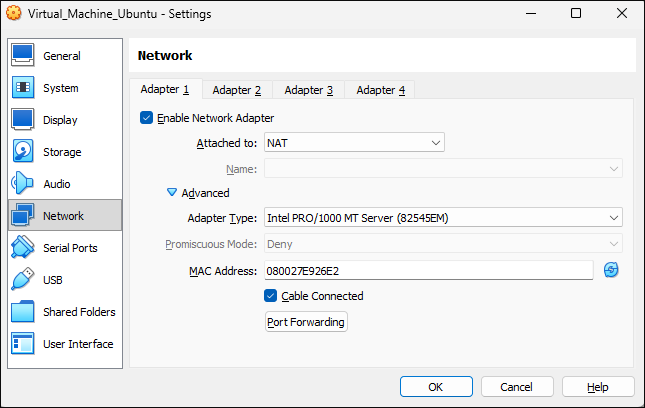
Make sure that the NAT connection type is select in virtual machine network settings and set up port forwarding, for example, the 1022 port of the local computer will correspond to the 22 port of the virtual machine:
Connect to the virtual machine on the local computer via SSH. To do this, select execute the command in the command line:
ssh -p <port number> <IP address>
In the substitutions:
<port number>. Specify the local computer port used at Step 3.
<IP address>. Specify IP address of the local computer.
For example:
ssh -p 1022 127.0.0.1
After executing the operations the virtualization environment is prepared, that is, the virtual machine is created and set up on the local computer.
To exchange files between the local computer and the virtual machine, use the WinSCP or FileZilla utility.
To work with the administrator console, after installing mobile platform server set up port forwarding of the local computer and the virtual machine to the 80 port.
See also:
Knowledgebase | Deployment and Preparation of Ubuntu-Based Server | Deployment and Preparation of Astra Linux-Based Server | Deployment and Preparation of Rocky Linux-Based Server