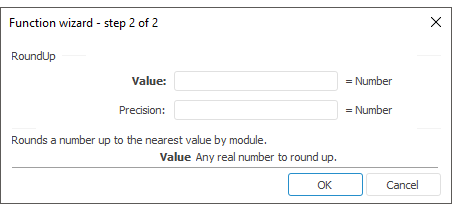
The function wizard for the RoundUp function looks as follows:
RoundUp (Value, Precision)
Value. Real value that should be rounded up.
Precision. The number of decimal places, to which the value must be rounded:
If Precision is greater than 0, the number is rounded to the specified number of decimal places to the right of the decimal point.
If Precision is equal to 0, the number is rounded to the nearest integer
If Precision is equal to 0, the number is rounded to the nearest integer.
NOTE. To determine the parameter, specify either the number or the address of the cell where it is located.
It returns the result of rounding the number to a nearest value greater in modulus.
| Formula | Result | Description |
| =RoundUp(124.658, 2) | 124,66 | It rounds the number 124.658 up to two decimal places to the right of the decimal point. |
| =RoundUp(B6,0) | 125 | It rounds the number from the B6 cell up to the nearest integer. The B6 cell contains the number 124.658. |
| =RoundUp(B6, C6) | 200 | It rounds the number from the B6 cell up to the number of decimal digits specified in the C6 cell. The B6 cell contains the number 124.658, and C6 contains -2. |
See also:
Function Wizard │ Mathematical │ Ceiling │ Even │ Floor │ Int │ MRound │ Odd │ Round │ RoundDown │ Trunc │ IMath.RoundUp