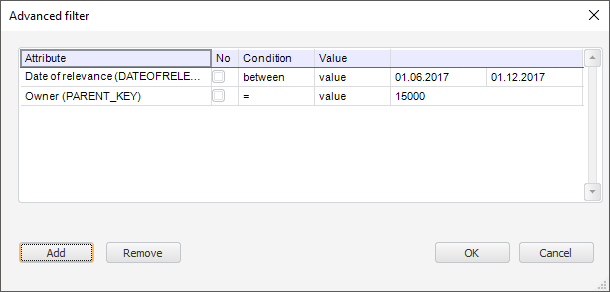
Dimension values are filtered by applying the conditions to dimension attributes values. Setting is performed in the Advanced Filter dialog box:
To add a condition:
Click the Add button. A new row to set up condition will be added to the table.
Select the attribute to which the condition should be applied in the Attribute column. All dimension attributes are available for selection.
Select the checkbox in the No column, if it is not required to set up the invers condition. For example, the attribute value is not equal to five.
Select one of the condition types in the Condition column:
=. Equal.
!=. Not equal.
in. Included in one of the defined values.
>. Greater.
>=. Greater or equal.
<. Less.
<=. Less or equal.
between. Is in the range of specified values.
Select the type of compared value in the Type column:
Value. The attribute value is set directly by the specific value
Parameter. The attribute value is set dynamically via the parameter or dimension attribute contained in the parameter.
Select the checkbox in the Ignore Empty column if it is required to filter dimension elements without taking into account empty values of the specified attribute in the Attribute column.
In the Value column specify the compared value or in the drop-down list select the dimension parameter/attribute that sets this value.
Value data type is set according to the attribute. If advanced filter is set for calendar dimension, then selection of calendar dimension levels as value will be available for the Calendar Block Type attribute.
NOTE. If the condition is set to the level that is excluded from calendar dimension, then selected attribute value will be reset.
If the "in" condition is selected, to enter the second and the following values, click the  button located at the end of the row. A new row to enter value will be added:

To remove the value, click the  button.
After the values are entered, they all will be displayed at the same row separated by comma:

Select the checkbox in the Do Not Filter From Empty Values column if it is required to filter dimension elements taking into account empty values of the specified dimension parameter/attribute in the Value column.
NOTE. It is available only for the Parameter compared value type.
As a result filtering condition of dimension elements by dimension attribute values will be added. To remove the selected condition, click the Remove button.
See also:
Setting Up Aggregation Operand by Dimension