Executing the example requires an XML file that contains map data in JSON format, a HTML page that contains the map and the topobase Russia.svg.
NOTE. When XML is automatically converted to JSON, the "@" character, which does not need to be removed, appears before attributes.
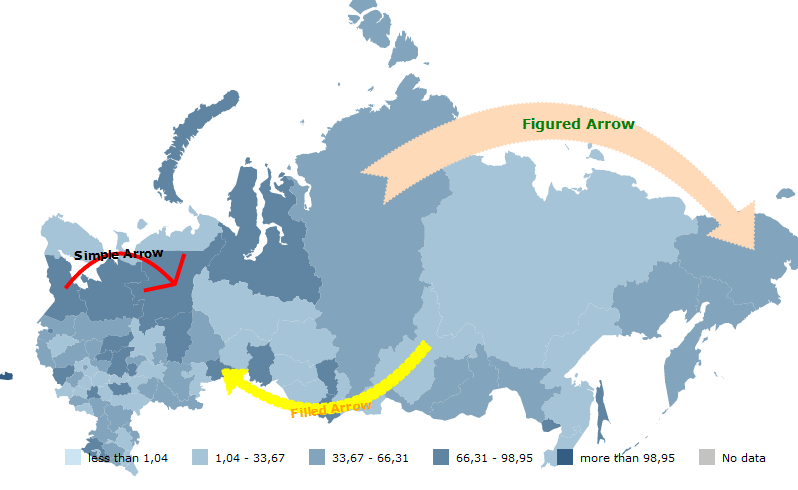
Add three different arrows to the map.
Description of the following fonts must be added to the item dictionary:
//For a shaped arrow
{
"@IsItalic" : "False",
"@FontFamily" : "Verdana",
"@Size" : "14",
"@Id" : "FiguredArrowFont",
"@IsBold" : "True",
"@Color" : "Green"
},
//For a filled arrow:
{
"@IsItalic" : "False",
"@FontFamily" : "Verdana",
"@Size" : "12",
"@Id" : "FilledArrowFont",
"@IsBold" : "True",
"@Color" : "Orange"
},
//For a simple arrow:
{
"@IsItalic" : "False",
"@FontFamily" : "Verdana",
"@Size" : "12",
"@Id" : "SimpleArrowFont",
"@IsBold" : "True",
"@Color" : "Black"
}
Add the list of arrows to the <MapChart> item:
"MapArrows" :
{
"MapSimpleArrow" :
{
"@PointerWidth" : "0.5",
"@TextOrientation" : "AlongTheArrow",
"@PointerLength" : "0.5",
"@StrokeThickness" : "4",
"@Text" : "Simple arrow",
"@TextBackground" : "Transparent",
"@Angle" : "50",
"@Font" : "{SimpleArrowFont}",
"@EndShape" : "{RU-KO}",
"@StrokeStyle" : "Solid",
"@Color" : "Red",
"@StartShape" : "{RU-KR}"
},
"MapFilledArrow" :
{
"@PointerWidth" : "0.15",
"@TextOrientation" : "AlongTheArrow",
"@PointerLength" : "0.1",
"@StrokeThickness" : "2",
"@Text" : "Filled arrow",
"@TextBackground" : "Transparent",
"@Angle" : "45",
"@Font" : "{FilledArrowFont}",
"@EndShape" : "{RU-KGN}",
"@StrokeStyle" : "Dash",
"@Color" : "Yellow",
"@StartShape" : "{RU-IRK}",
"@BasementWidth" : "0.05"
},
"MapFiguredArrow" :
{
"@PointerWidth" : "0.15",
"@TextOrientation" : "Horizontal",
"@PointerLength" : "0.1",
"@StrokeThickness" : "2",
"@Text" : "Shaped arrow",
"@TextBackground" : "Transparent",
"@Angle" : "45",
"@Font" : "{FiguredArrowFont}",
"@EndShape" : "{RU-CHU}",
"@StrokeStyle" : "Dot",
"@Color" : "PeachPuff",
"@StartShape" : "{RU-KYA}",
"@BasementWidth" : "0.1"
}
}
Three arrows are displayed in the map after executing this example:
See also: