
 Open the dialog box
When a cell is selected, which value is calculated using the configured algorithm executed on change, the formula string displays the calculated formula. If the cell value is obtained after calculating several algorithms with several blocks, the formula string displays the formula of the last algorithm and the last block. If the formula contains the operand displayed in data entry form table areas, it is displayed as address of the cell, to whch the formula refers. If the formula contains the operand that is not displayed in data entry form table areas, it is displayed as a value. Operands are used in the form only if they are located on loaded data entry form sheets.
If data in the cell is calculated using the specified calculation practice, where binding to data entry form is set up, the information about calculation formula is available for the cell.
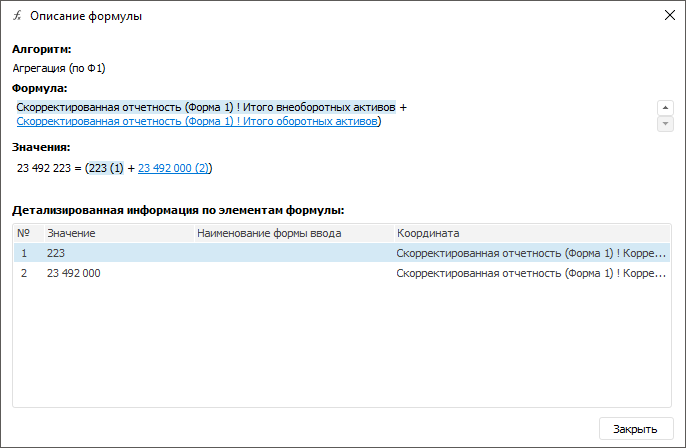
To view information about formula, use the Formula Description dialog box:
NOTE. The option is available only in the desktop application.
The dialog box contains the following information:
Algorithm. Calculation algorithm name that is used to calculate value in the cell. If a cell has several algorithms, the last algorithm is displayed, which is used to calculate the final cell value.
Formula. Calculation formula of value in the cell, it is set as: <Source name>[<Dimension element name>]. If dimension element matches in all formula operands, it is not displayed in the formula.
Values. Formula with substituted values with sequence numbers.
Detailed Information About Formula Elements. List of values containing the following information:
Sequence Number. Sequence number of the value matching the number from the value formula.
Value.
Data Entry Form Name. Name of the data entry form linked to the element calculation. Double-clicking the data entry form name or selecting the Open Form context menu item opens the form bound to algorithm.
Coordinate. Source name and selection by all its dimensions.
If the value is selected in the Formula area, the following is automatically selected: the string with details about this element in the Detailed Information About Formula Elements area and the value in the Value area. If the string with details is selected in the Detailed Information About Formula Elements area, the appropriate value is automatically selected in the Formula area. If the value is selected in the value area, the following is automatically selected: the appropriate value in the Formula area and the string with details about this element in the Detailed Information about Formula Elements area.
To finish viewing formula description, click the Close button or press  .
.
After finishing to view details about the values obtained after executing the specified calculation practice, go to the step if it is required to:
See also:
Working with Ready Data Entry Form
 Formula Description button of the Table ribbon tab.