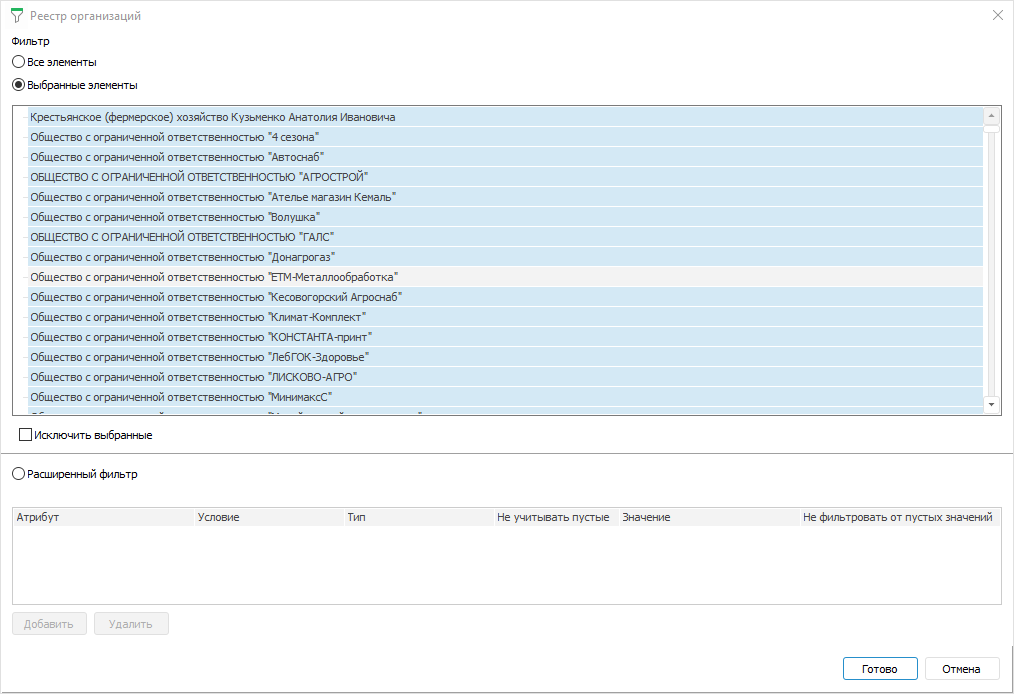
Selecting by dimensions allows for limiting a list of dimension elements, based on which table area will be built.
To select dimension elements:
In the dialog box that opens select one of the filter options:
All Elements. All elements will be selected. It is not available for fixed dimensions with disabled aggregation
Selected Elements. Select only required elements or exclude selected elements from selection by selecting the Exclude Selected checkbox. Only one element can be selected for fixed dimensions with disabled aggregation, and the Exclude Selected checkbox is disabled
Advanced Filter. Add rules to the advanced filter by clicking the Add button. Set:
Attribute. Select a dimension attribute in the drop-down list
Condition. Set filtering condition. Available options: equal, not equal, greater, less, greater or equal, less or equal, included, not included
Type. Select filter type. Available options: value, parameter
Ignore Empty. Empty values will be ignored if the checkbox is selected. It is available only for the Parameter type
Value. It depends on the selected attribute and type:
If the Value type is selected, the specific value corresponding to the attribute type is specified in the box.
If the Parameter type is selected, the attribute for the box is selected in the drop-down list representing a tree of available parameters with attributes.
If attribute is linked and the Value type is selected, the field has a drop-down menu with the dictionary available values.
Do Not Filter from Empty Values. Attribute empty values will be filtered if the checkbox is selected.
NOTE. If alternative hierarchy is set up for the dimension, and advanced parameter filter is set, the advanced filter is applied to the alternative dictionary.
Click the Delete button to delete the advanced filter.
Finish selection by clicking the Finish button.
See also:
Setting Up Table Area | Building Data Entry Form