The checksum is used to check metadata integrity, it is performed based on object contents and changes on any object change. To verify checksum, it has to be initially performed. On the further object check, the previous checksum is compared to the current one. If the checksum changed, this means that the object was changed.
To perform checksum in update manager, select the Update > Perform Checksums main menu item.
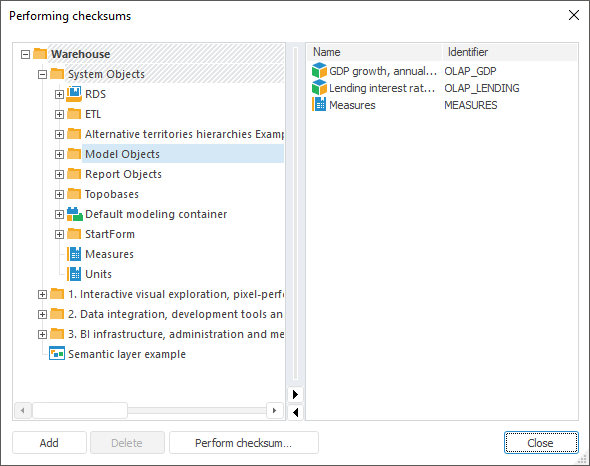
After the command was executed, the Performing Checksums dialog box opens:
The left part of the dialog box contains schema object tree and the right part contains the update structure and it generates the list of objects for which the checksum will be performed.
To add the object selected in the tree to the list:
Click the Add button.
Select the Add Object context menu item.
Drag&drop the object.
The display of objects in the tree can be set up using the context menu items:
Show Names. The tree displays only object names.
Show Identifiers. The tree displays only object identifiers.
Show Names and Identifiers. The tree displays both object names and identifiers.
To search for object in the tree, press CTRL+F that opens a standard search dialog box.
To delete the selected object from the list, click the Delete button; a confirmation message is displayed.
To start performing checksum of the created objects list:
Click the Perform Checksum button. A standard file saving dialog box opens.
Click the Save button.
After executing the operations, the checksum is performed and saved. A checksum file has the *.crc extension.
To verify checksums in update manager:
Select the Update > Verify Checksums main menu item. After executing the command a standard dialog box of file selection opens.
Specify the file that contains previously saved checksums.
After executing the operations, the Verifying Checksums dialog box opens:
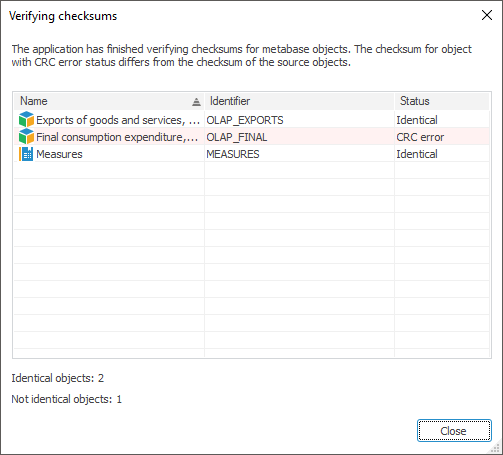
The dialog box displays a table with results of verifying the previous checksum with the current one. Identifiers, names and verification status are displayed for objects.
The objects with different checksums are highlighted, and they are listed under CRC Error status.
See also: