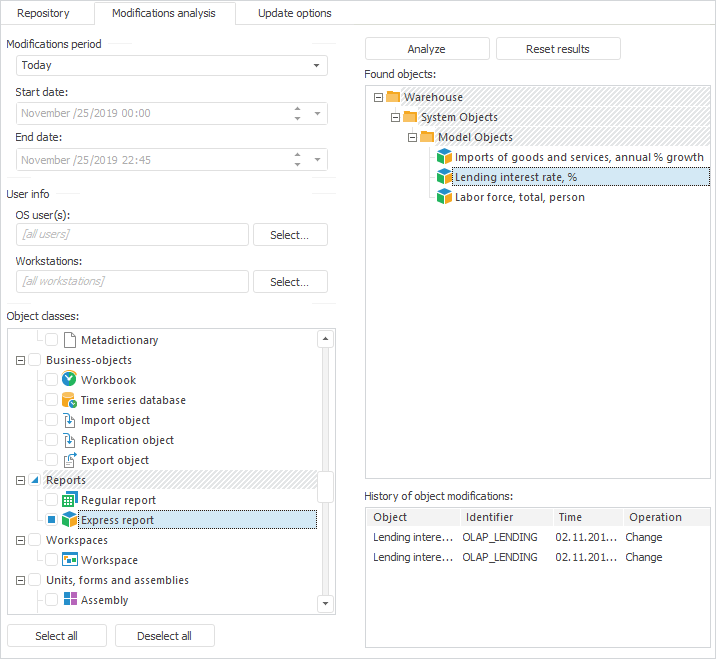
Object modifications analysis is performed on the Modifications Analysis tab of update manager and it is used to get information about repository object modifications depending on specified parameters.
NOTE. To analyze changes and use the object changes history, create a log of access protocol fixing the creation, change, or removal of actions by objects.
To evaluate modifications, determine the following parameters:
After parameters have been selected, analyze modifications.
To execute modifications analysis:
Select the Modifications Analysis > Start Modifications Analysis main menu item.
Click the  Modifications Analysis button on the Update Manager toolbar.
Click the Analyze button on the Modifications Analysis tab.
Analysis results will be displayed in the Found Objects list. After an object is selected in the list of found objects, the History of Object Modifications table shows information on object changes: name and identifier, date and time, operation, user.
NOTE. Objects displayed in bold font are already added to the update.
To clear the Found Objects list, click the Reset Results button.
Objects can be added from the Found Objects list in several ways:
Select one of the object context menu items:
Add to Update. The selected objects are added to the update.
Add All Objects of This Type. All the objects of the same type as the selected object are added to the update.
Add All to Update. All the objects are added to the update.
Add to Update with Nested Elements. It adds the object together with all its child objects. This command is missing for the objects, which do not contain nested objects.
Double-click the object with the main mouse button in the Found Objects list.
Drag objects from the Found Objects list to the Update panel. If the user drags a folder with objects, only the objects of this folder as displayed in the Found Objects list will be included in the update.
Repository objects will be added to the Update panel after the selected object, to the selected folder or at the end of hierarchical list.
Objects added to the update will appear in bold font in the Found Objects list.
See also:
Creating an Update | Object Update Options

 Modifications period