To cache data in Foresight. Analytics Platform, In-Memory is applied. In-Memory is a subsystem that enables data loading from sources (cube caching), data local storage, quick multiuser access and high performance. Caching enables to avoid sending request each time the data sample from DBMS is required. The following repository objects support In-Memory caching:
All cube types, except calculated (virtual cubes and cube views use source cache).
Time series databases.
ADOMD cubes.
All dictionary types except for calendar dictionary, composite dimension of virtual cube and scenario dimension of modeling cube.
NOTE. Caching in repository base is enabled by default for dictionaries. Caching mechanism can be changed in the Settings.xml or registry file. Settings are determined on client workstations if the desktop application is used, or at BI server.
Data is stored in file cache. Cache stores values from definite point and coordinates identifying point binding to data source. Files containing the data currently in use are mapped to computer memory. Memory paging mechanism provides a possibility to work in limited RAM with almost unlimited size of data stored in files. In case of out-of-memory state, data loading/downloading is page-by-page.
On caching dictionaries, attribute values corresponding to dictionary elements are saved to the file cache. It is taken into account whether dictionary has parameters (the cache is created for each set of parameters), elements have validity period (MDM dictionaries), various users have access permissions to elements.
When the In-Memory mechanism is used, a special structure with source data is loaded to RAM memory. Further data processing (creating data slice, filtering, aggregation, sorting, and so on) is executed in the RAM memory, without addressing data source. Thus, the platform response time is reduced and user work interactivity increases. Cache provides incremental data processing where if some cells are modified, then only related with those cells data is recalculated and not the whole source. On working user access permissions to data are taken into account. Data segments that are set up on creating a role model for business process modeling and for Foresight Budgeting are also taken into account.
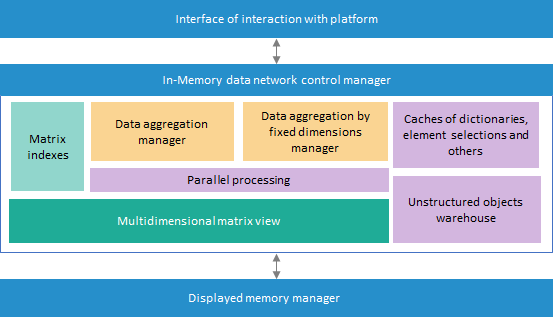
The In-Memory mechanism architecture looks as follows:
Architecture of In-Memory includes:
Interface of communication with Platform. It provides to the platform tools the data actually in use.
In-Memory data network control manager. It fully controls cache: creating and working with files, interaction with displayed memory manager, controlling data structures, allocating computer resources on executing various operations and other functions.
Displayed memory manager. It provides the quickest possible loading of required file fragment to RAM using operating system possibilities, search of required data in RAM to work with it.
In the desktop application, the cache management of separate objects is performed on the Cache tab of the Object Properties dialog box. BI server will apply data caching for objects which cache was enabled in the desktop application.
By default, cache is created in the following forlders:
Windows. C:\ProgramData\Foresight\Foresight Analytics Platform\inmem_data.
Linux. /var/tmp/inmem_data.
NOTE. Users that will work with cache must have read and write permissions to specified folders.
The caching mechanism settings are changed in the Settings.xml or registry file. Settings are determined on client workstations if the desktop application is used, or at BI server.
After data is changed and saved, updated data will be in the cache of the computer used for work. To update cache on computers of other users of the Foresight. Analytics Platform desktop application, click the Update Cache button on the Cache tab of the Object Properties dialog box. The cache is cleared and recreated.
It is also possible to set up scheduled cache update on each user's computer using task scheduler. Using the UpdCache setting in the Settings.xml/registry file, it is possible to forward cache update process start to any BI server. In this case, only modified data corresponding to the specified selection will be updated in cache.
The In-Memory divided cache enables working with cached data when several Foresight Analytics Platform instances are started in desktop and web applications. In the web application the cluster of several servers is created. The servers use productive In-Memory data caching with shared cache use.
To use divided cache:
Place cache on the file server and set up access to it.
Specify the path to cache on the file server, using the DataDir property:
In the Settings.xml file:
<...>
   <Key Name="InMem">
      <Key Name="UseInMem" Value="true"/>
      <Key Name="DataDir" Value="C:\ProgramData\Foresight\Foresight Analytics Platform\inmem_data\"/>
      <Key Name="MemLimitMb" Value="6000"/>
   </Key>
</...>
Execute one of the operations:
Set True in the SharedAccess property:
In the Settings.xml file:
<...>
   <Key Name="InMem">
      <Key Name="UseInMem" Value="true"/>
      <Key Name="DataDir" Value="C:\ProgramData\Foresight\Foresight Analytics Platform\inmem_data\"/>
      <Key Name="MemLimitMb" Value="6000"/>
      <Key Name="SharedAccess" Value="true"/>
   </Key>
</...>
NOTE. If divided cache must be use on several servers or workstations, then property value is set in settings of each server or workstation.
Place the file named shared.access without subfolders to the cache folder.
After executing the operations the divided cache to work with cached data on simultaneous start of several Foresight Analytics Platform instances will be used.
The current implementation has the following constraints and features when working with data caching:
Cache is not used, if working with time series database is executed in the Analytical Queries (OLAP) tool, and the Attributes display version is enabled.
Cache created for time series databases will not be applied on working in the Data Series Analysis tool.
If any structure modifications are made in source dimensions (set of attributes is changed, new elements are added, hierarchy of existing elements changes and other modifications), for further correct work it is necessary to update cache.
Values by calculated facts of standard cube are not cached.
It is impossible to create cache, if cube has several sources, and the same dimension is linked in one of them and is not bound in others.
On creating cache, aggregations are calculated for default cube display option. For other display options, aggregation is calculated on the first request.
On editing cached dictionary, the current cache is reset and a new cache is created on the next dictionary call.
On caching parameterized dictionary, dictionary caches are created with each parameter sets in use.
On caching dictionaries with specified access permissions, dictionary caches corresponding to access permissions of each user are created.
Working with dictionaries cache in development environment is supported only via the IDimInstance interface.
Working with cache is available only inside one started platform instance.
See also: