Operating system requirements: iOS 5.0 or later.
Mobile device: iPad.
This example creates and displays a dimension panel container. After starting the example the following operations are executed:
A dimension panel container title is created and set.
A separator between two data views is created and set.
A dimension panel is created and set.
A dimension panel container is created and set.
Executing the example requires to place the following code instead of the executeExample method of the ViewController class (see the Displaying of Express Report section:
// Creates a dimension panel controller
-(MADimensionsPanelTableViewController *) createDimensionsPanelTableViewController {
    // Get express report controller
    MAExpressAnalysisReportViewController *contr = (MAExpressAnalysisReportViewController *)m_controller;
    // Get express report delegate
    EAReportDelegateImpl *delegate = [contr delegate];

    // Get a pivot object building data tables
    SPPLPivot pivot = PPLPivot::pivot([delegate olapReport]);

    // Create a dimension panel delegate
    MADimensionsPanelTableViewDelegate *panelDelegate = [[MADimensionsPanelTableViewDelegate alloc] initWithPivot: pivot];

    // Create a dimension panel data source
    MADimensionsPanelTableViewDataSource *panelDataSource = [[MADimensionsPanelTableViewDataSource alloc] initWithPivot: [panelDelegate pivot]];

    // Create a dimension panel controller
    MADimensionsPanelTableViewController *tableViewCtrl = [MADimensionsPanelTableViewController new];
    [tableViewCtrl setPanelDataSource: panelDataSource];
    [tableViewCtrl setPanelDelegate: panelDelegate];
    return tableViewCtrl;
}
-(void)executeExample {
    // Create a dimension panel container controller
    PanelViewController *panelViewCtrl = [PanelViewController new];
    // Create a dimension panel container
    PanelView *panelView = (PanelView *)[panelViewCtrl view];
    // Create a dimension panel controller
    MADimensionsPanelTableViewController *tableViewCtrl = [self createDimensionsPanelTableViewController];
    // Set dimension panel
    [panelView setContentView: [tableViewCtrl view]];

    // Get separator between two data views
    MASeparatorView *separatorView = [[MASeparatorView alloc] initWithFrame:CGRectZero];
    [separatorView setPanelVisible: YES];
    // Display top arrow on separator
    [separatorView setUpArrowVisible: YES];
    // Display bottom arrow on separator
    [separatorView setDownArrowVisible: YES];
    // Set separator between two container data views
    [panelView setSeparatorView: separatorView];

    // Create a dimension panel container title
    MATopView *topView = [[MATopView alloc] initWithFrame: CGRectZero];
    // Set title text
    [[topView titleLabel] setText: @"Prognoz"];
    // Set title
    [panelView setTopView: topView];

    // Load dimension panel container subviews
    [panelView layoutSubviews];
    // Display dimension panel container
    [self showViewControllerInNavigationController: panelViewCtrl];

    // Create a dimension panel container
    UIView *envView = [UIView new];
    // Set container
    [panelView setEnvironmentView: envView];

    // Set dimension panel container fill color
    [panelViewCtrl setEnvironmentColor: [UIColor colorWithRed:0 green:1 blue:1 alpha:0.15]];
    [envView setBackgroundColor: [panelViewCtrl environmentColor]];
}
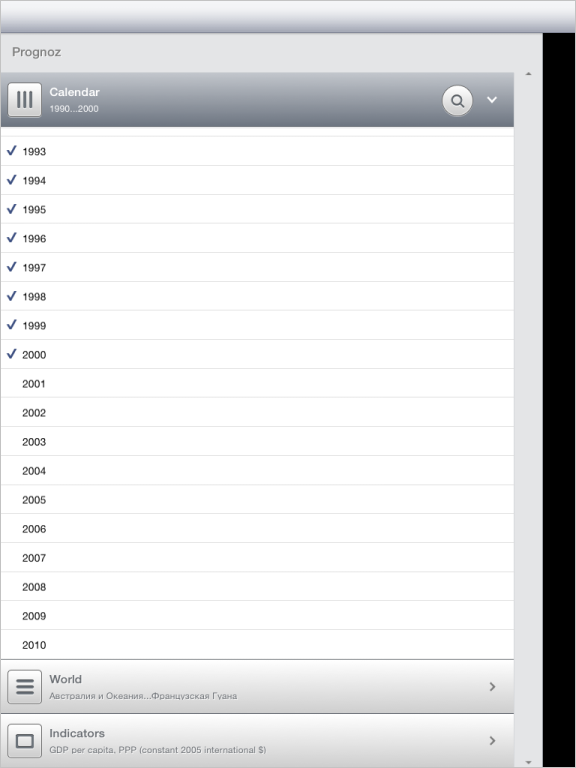
After executing the example the mobile device screen displays the dimension panel container filled with green color. The container includes title, dimension panel and separator. Top and bottom arrows are displayed on the view separator:
See also: