Operating system requirements: iOS 5.0 or later.
Mobile device: iPad.
This example describes some methods of working with map container. After starting the example the following operations are executed:
A map data source is created.
Map data source settings are loaded.
A container is created for simultaneous input of SVG map and Apple map.
An SVG map view controller is created.
The map in use is checked for compatibility with SVG map view controller.
It is determined whether a 3D map data source is used.
A map used by SVG map view controller is loaded.
SVG map view controller is set as a primary container view.
An Apple map data view controller is created.
A map used by Apple map data view controller is loaded.
An Apple map data view is set in container.
world.svg. Used map topobase.
Executing the example requires to place the following code instead of the executeExample method of the ViewController class (see the Displaying of Express Report section):
-(void)executeExample {
    // Create a report delegate
    EAReportDelegateImpl *delegate = [[[EAReportDelegateImpl alloc] initWithOlapReport:m_olapReport] autorelease];
    // Create an Apple map
    [self createBubbleMap: delegate];
}
// Creates an Apple map
-(void)createBubbleMap: (EAReportDelegateImpl *) delegate {
    // Create an initialize Apple map data view controller
    MAMapDataBubbleViewController *mapDataBubble= [[MAMapDataBubbleViewController alloc] initWithDatasource:(MapDataViewDatasource *)delegate.mapDatasource];
    // Create a map container
    MAMapDataViewContainerController *container = [MAMapDataViewContainerController new];
    // Set Apple map delegate
    mapDataBubble.delegate = container;
    // Load Apple map topobase
    [mapDataBubble setTopobaseWithData:delegate.mapBubbleTopobase];
    // Set Apple map data view in container
    container.bubbleViewController = mapDataBubble;
    // Display report containing Apple map
    [self showViewControllerInFullScreen: [container bubbleViewController]];
}
// Creates an SVG map
-(void)createSVGMap: (EAReportDelegateImpl *) delegate {
    // Load file with map topobase
    NSData *file = [NSData dataWithContentsOfFile:[[NSBundle mainBundle] pathForResource:@"world.svg" ofType:nil]];
    if (file != nil) {
        // Create an SVG map view controller
        MAMapData2DViewController *map2d = nil;
        // Create a map controller
        MAMapDataViewContainerController *container = [MAMapDataViewContainerController new];
        // Check compatibility of loaded map
        if ([MAMapData2DViewController topobaseIsSupported:file]) {
            // Set for map data source whether 3D map data source is used
            ((MapDataViewDatasource *)delegate.mapDatasource).isFor3dMap = NO;
            // Initialize map controller by means of data source
            map2d= [[MAMapData2DViewController alloc] initWithDatasource:(MapDataViewDatasource *)delegate.mapDatasource];
            // Load map topobase
            [map2d setTopobaseWithData:file];
            // Set map delegate
            map2d.delegate = container;
            // Set primary container view
            container.mainViewController = map2d;
            [self showViewControllerInFullScreen: [container mainViewController]];
        }
        } else {
        NSLog(@"File with world.svg map topobase is not found");
    }
}
It is also required to replace the code in the static example file MAExpressAnalysisReportViewControllerDelegateImpl.mm in the initWithOlapReport: method in the block:
if (self.isMapEnabled)
with the following code:
// Get report settings
SNDictionary mapOlapPlist = m_olapReport->storageDictionary()->objectForKey<NDictionary>(MAP_OLAP_KEY);
// Create a report
SPPLOlapReport mapOlapReport = NULL;
if (mapOlapPlist != NULL)
{
    mapOlapReport = PPLOlapReport::olapReport(m_olapReport->descriptor(), mapOlapPlist);
}
// Create a pivot object for building data table
m_mapPivot = (mapOlapReport != NULL) ? PPLPivot::pivot(mapOlapReport) : PPLPivot::pivot(m_olapReport);
// Create a map data source
m_mapDatasource = [[MapDataViewDatasource alloc] initWithPivotTable: PPLPivotTable::pivotTable(m_mapPivot) withFullTopoSelection:YES];
// Get map data view settings
SNDictionary mapSettings = m_olapReport->mapSettings();
// Get map data sourec settings
SNDictionary mapDSSettings = m_olapReport->storageDictionary()->objectForKey<NDictionary>(MAP_DS_KEY);
// Get express report selection area settings
SNDictionary selectionSetings = m_olapReport->selectionDictionary();
// Load map data source settings
[m_mapDatasource loadSettings:mapSettings dataStorageSettings:mapDSSettings indicatorEmptySettings:selectionSetings];
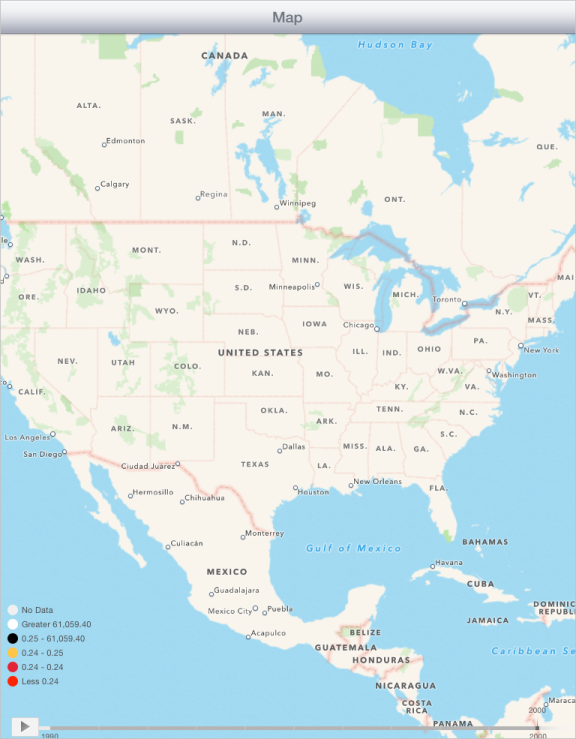
After executing the example the mobile device screen displays Apple map:
Then replace the strings in the executeExample method of the ViewController class:
[self createBubbleMap: delegate];
with the following code:
[self createSVGMap: delegate];
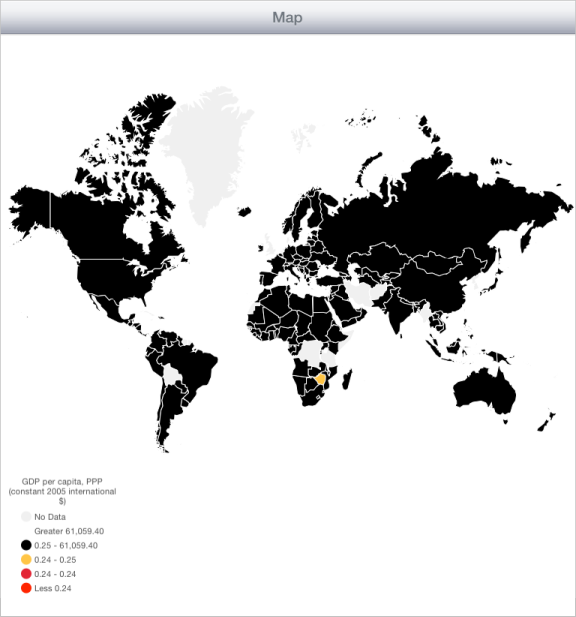
After executing the updated example the mobile device screen displays a map built by means of SVG map:
See also: