Indicating Long-Term Processes
Article number: KB000001
General Information
Related blocks:
Description
There are two methods of indication of long-term processes on creating custom forms in Fore:
Use the WaitCursor static property of the Ui.WinApplication class. When this property is set to True, the mouse cursor looks like hourglass (
 ), when this property is set to False, the cursor changes to its original look.
Example of code:
Sub OperationX;
Begin
WinApplication.WaitCursor := True;
Try
// Long-term operation
Finally
WinApplication.WaitCursor := False;
End Try;
End Sub OperationX;
Use the BeginOperation and EndOperation methods of the form object. When the BeginOperation method is called the form displays a standard progress bar at the bottom of the form with the text set by the developer. For example:
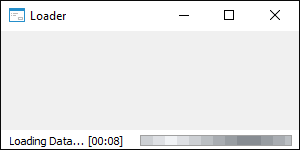
After finishing an operation you need to call the EndOperation method to return the form to initial state.
Example of code:
Sub OperationY;
Begin
BeginOperation(NotificationEdit.Text);
Try
// Long-term operation
Finally
EndOperation;
End Try;
End Sub OperationY;
These methods must be used in the Try … Except … Finally … End Try operator to correctly finish a long-term process if an exception is thrown.