RootBands: IDataGridRootBands;
The RootBands property returns the collection of fixed table bands.
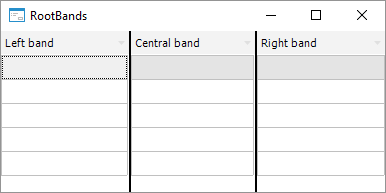
The table contains three fixed bands: central, right, and left. Each band may be used as a parent one for other table bands or columns. By default, all table bands and columns are located in the central fixed band, the left and the right fixed bands are hidden. Fixed bands are divided with a border, which color and width can be determined in the FixedBorderColor and FixedBorderWidth properties respectively.
Executing the example requires a form, a button named Button1 positioned on it and the DataGrid component named DataGrid1. At least three columns must be created in the DataGrid1 component.
Sub Button1OnClick(Sender: Object; Args: IMouseEventArgs);
Var
Columns: IDataGridColumns;
RootBands: IDataGridRootBands;
Begin
Columns := DataGrid1.Columns;
RootBands := DataGrid1.RootBands;
Columns.Item(0).ParentBand := RootBands.Left;
Columns.Item(1).ParentBand := RootBands.Center;
Columns.Item(2).ParentBand := RootBands.Right;
End Sub Button1OnClick;
Clicking the button arranges places columns in different fixed bands.
See also: