Color: PP.Color | RGB |String
The Color property determines tree node color.
Use JSON or the setColor method to set the property value and the getColor method to get the property value.
To execute the example, the page must contain the TreeList component named «treeList» (see Example of Creating the TreeList Component). Create a new node and add it to child elements of the node with the World contents:
// Create a new node
var newNode = new PP.Ui.TreeNode({
    // Set node color
    Color: "#C3D66C",
    // Set node font
    Font: new PP.Font({ IsBold: true }),
    // Set icon source
    ImageUrl: "../build/img/app/icons16x16.png",
    // Set tooltip text
    ToolTip: "New tooltip",
    Text: "Europe",
    Columns: ["1", "1", "1"],
});
// Add the node to the tree
treeList.getNodes().getItem(0).getNodes().insertNode(newNode);
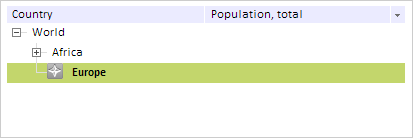
As a result, new node with an icon is added to the tree:
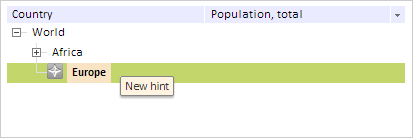
Hover the mouse cursor over the first element. As a result a tooltip with a new value is shown:
See also: