add(range: PP.Ui.TabSheetRange);
range. Cell range to merge.
The add method adds the specified range of table cells to the current one.
This method returns an object of the TabSheetRange type: merged range of table cells.
To execute the example, the HTML page must contain the TabSheet component named tabSheet (see Example of Creating the TabSheet Component). Determine two cell ranges and merge them:
// Function for range coordinate output
var wrireRangeCoord = function (range, name) {
    // Get range corner coordinates
    var coords = range.getCorners();
    console.log(name + ": (" + coords.tlCoord.rowIndex + ", " + coords.tlCoord.colIndex + ")-(" +
        coords.brCoord.rowIndex + ", " + coords.brCoord.colIndex + ")");
};
// Determine a new range
var range1 = tabSheet.getRange(1, 1, 1, 2);
// Set commentary for the created range
range1.setComment("Range 1");
this.wrireRangeCoord(range1, "Range 1");
// Determine the second range
var range2 = tabSheet.getRange(2, 1, 2, 2);
// Set commentary for the second range
range2.setComment("Range 2");
this.wrireRangeCoord(range2, "Range 2");
// Merge two ranges
var range3 = range1.add(range2);
this.wrireRangeCoord(range3, "Merged range");
// Refresh the merged range
range3.reset();
// Select the range
range3.select();
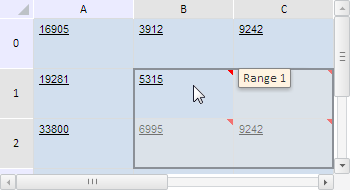
After executing the example two cell ranges are determined and merged. Each cell is assigned a comment that indicates, which range it belongs to, and the merged range is selected:
Coordinates of ranges are shown to the browser console:
First range: (1, 1)-(2, 1)
Second range: (1, 2)-(2, 2)
Merged range: (1, 1)-(2, 2)
Then check if the merged range contains the second one, if the first range is identical to the difference of the merged and the second ranges, and if the first range intersects the merged one:
// Check if the second range is contained in the merged range
var isContains = range3.contains(range2);
console.log("Merged range " + (isContains ? "" : "does not ") + "contain the second range");
// Get the difference of the merged and the second ranges
var subtracted = range3.subtract(range2)[0];
/* Check if the first range is identical to
the difference of the merged and the second ranges */
var isEquals = range1.equals(subtracted);
console.log("The first range " + (subtracted ? "" : "is not ") + "identical to the difference of the merged and the second ranges");
// Check if the first and the merged ranges intersect
if (range3.intersects(range1)) {
    // Get their intersection area
    var intersected = range3.getIntersectionWith(range1);
    // Select intersection area
    intersected.select();
} else {
    console.log("The first and the merged ranges do not intersect")
};
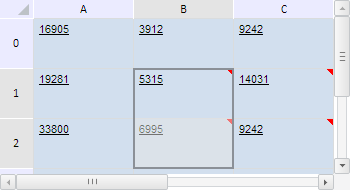
After executing the example the cells that belong to both first and merged ranges are selected:
The browser console shows the results of the above-listed checks:
Merged range contains the second range
The first range is identical to the difference of the merged range and the second one
Seebsp;also: