getNonSpanCoordUnderMouse(event: MouseEvent);
event. Mouse cursor event.
The getNonSpanCoordUnderMouse method returns current coordinate of the cell under the mouse cursor ignoring merges.
This method returns an object of the PP.Ui.TabSheetCoord type.
To execute the example, the HTML page must contain the TabSheet component named tabSheet (see Example of Creating the TabSheet Component). Merge cells and process the MouseMove event, while showing in the browser console coordinates of the cells under the cursor and their DOM elements:
// Get a cell range by the specified coordinates
var range = tabSheet.getRange(0, 1, 1, 0);
// Merge cells by the obtained range
tabSheet.merge(range)
// Process the MouseMove event
tabSheet.MouseMove.add(function (sender, eventArgs) {
    var e = eventArgs.Event;
    // Get the cell coordinates by the current cursor position without considering cell spans
    var tabSheetCoord = tabSheet.getNonSpanCoordUnderMouse(e);
    console.log("Cell coordinates: (" + tabSheetCoord.rowIndex + ", " + tabSheetCoord.colIndex + ")");
    // Get DOM element of cell
    var domElement = tabSheet.getNodeUnderCoord(tabSheetCoord.rowIndex, tabSheetCoord.colIndex);
    console.log("DOM element:");
    console.log(domElement);
});
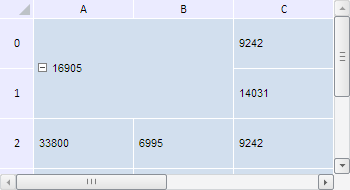
As the result of the example execution cells in the (0, 0) - (1, 1) range are merged:
On moving the mouse cursor browser console shows coordinates of the cell under the cursor (ignoring the merge) and DOM elements of these cells:
Cell coordinates: (0, 1)
DOM element:
<div id="cell_r_0_c_0_tabSheet1" class="PPUiTabSheetCell" style="background-color: rgb(210, 223, 238); vertical-align: middle; height: 97px; width: 197px;">…</div>
Cell coordinates: (1, 1)
DOM element:
<div id="cell_r_0_c_0_tabSheet1" class="PPUiTabSheetCell" style="background-color: rgb(210, 223, 238); vertical-align: middle; height: 97px; width: 197px;">…</div>
See also: