The page below gives code of legend setup in the JSON format. The code must be placed to the XML file that contains map settings, within the <MapChart> root item. The Russia.svg topobase must be available. Item dictionary must include:
Description of the font with the ID BlackFont;
Description of a tooltip with the ID Tooltip;
Description of the effect with the ID BorderEffect.
"MapShapes": {
"MapShape": {
"Id": "RU-KHM",
"ToolTip": "{Tooltip}",
"MapShape.Label": {
"MapLabel": {
"@Background": "White",
"@Width": "100",
"@MaskText": "This {0}",
"Text": "Khanty",
"@Top": "10",
"@BorderRadius": "0",
"@Padding": "2 2 2 2",
"@Font": "{BlackFont}",
"@Visibility": "Visible",
"@Height": "400",
"@BorderThickness": "1",
"@Left": "5",
"@BorderColor": "Red",
"@TextWrapping": "NoWrap",
"@Margin": "2 2 2 2"
}
},
"Effect": "{BorderEffect}"
}
}
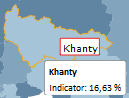
After executing the example the label Khanty is displayed for the map area with the RU-KHM ID. On hovering over the area the borders are highlighted in orange and the tooltip pops up:
See also: