addItem(settings: Object);
settings. Object with column settings.
The addItem method adds a child column to the column.
To execute the example, the HTML page must contain the DataGrid component named grid (see Example of Creating the DataGrid Component). Check if there are child columns in the second column and add a new child column to it:
// Get table dimension
var measure = grid.getMeasures();
// Check child columns in the second column
if (measure.getColumns()[1].hasItems()) {
    console.log("Column has child columns");
} else {
    console.log("Column does not have child columns");
}
// Create data for row
var column = {
    // Set table
    DataGrid: grid,
    // Set row header
    Title: "Column",
    // Set row name
    Name: "new",
    // Set column width
    Width: 60
};
// Add a new column to child columns
measure.getCurrentMeasures().Structure.Columns.Column[1].Items = [column];
measure.getColumns()[1]._Items = [];
measure.getColumns()[1].addItem(column);
// Add data to rows
var k = 10;
for (var i in grid.getData().Rows.Row) {
    grid.getData().Rows.Row[i].Cells.new = {
        "@SI": "2",
        CellData: {
            "@FT": "Data",
            "@V": "Data"
        }
    };
}
// Refresh table
grid.refresh();
The console displays result of the check whether there are child elements:
Column does not have child columns
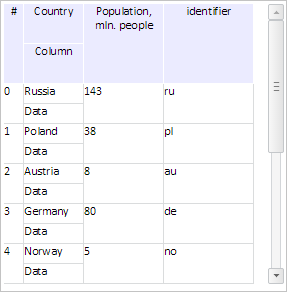
As a result a new child column is added to the second column:
Check if the second column contains visible child columns, get the second-level column and output name and header of its parent column:
// Determine if the second column has visible child columns
if (measure.getColumns()[1].hasVisibleItems()) {
    console.log("Column has visible child columns");
} else {
    console.log("Column does not have visible child columns");
}
// Get the second-level column
var column2 = measure.getColumns()[1].getItems()[0];
// Get nesting level of this column
console.log("Nesting level of column: " + column2.getLevel());
// Get parent column name
console.log("Parent column name: " + column2.findAllParentColumns());
// Get parent column header
console.log("Parent column header: " + column2.getParentColumn().getTitle());
As a result the console displays the following information:
Column has visible child columns
Nesting level of column: 2
Parent column name: country
Parent column header: Country
See also: