LastHScrollBarPos: Number;
The LastHScrollBarPos property determines position of horizontal scrollbar slider.
Use JSON or the setLastHScrollBarPos method to set the property value, and the getLastHScrollBarPos method to get the property value.
Default property value is 0.
To execute the example, the HTML page must contain the DataGrid component named grid (see Example of Creating the DataGrid Component). Set new slider positions on horizontal and vertical scrollbars, hide table cell borders and set new parameters of table scrolling:
function printScrollContainerInfo() {
    console.log("Top container indent: %s", grid.getScrollContainerIndent());
}
// Set new table size
grid.setSize(150, 150);
// Set slider position on scrollbars
grid.setLastHScrollBarPos(50);
grid.setLastVScrollBarPos(50);
// Set smooth scrolling mode
grid.setScrollType(PP.Ui.DataGridScrollType.Smooth);
// Set scroll step
grid.setMouseWheelScrollStep(1);
// Set delay time on scrolling
grid.DEFAULT_SCROLL_MOTION_INTERVAL = 1000;
grid.setScrollingSlowMotionInterval(grid.DEFAULT_SCROLL_MOTION_INTERVAL);
// Refresh table
grid.refresh();
// Determine top container indent
printScrollContainerInfo();
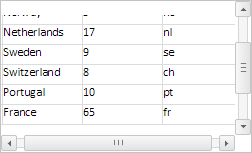
After executing the example table size is reduced, positions of 50 pixels are set for horizontal ad vertical scrollbar sliders, cell borders are hidden:
The browser console displays the appropriate top container indent for table scrolling:
Top container indent: -50
The smooth scrolling mode is also set with the step of 1 pixel and delay time of 1 second.
See also: