HeaderDblClick: function(sender, args);
sender. Event source.
args. Event information.
The HeaderDblClick event occurs on the double click on the table header.
To execute the example, the HTML page must contain the DataGrid named grid (see Example of Creating the DataGrid Component). Set the HeaderDblClick event handler:
// Set the HeaderDblClick event handler
grid.HeaderDblClick.add(function() {
    // Output to the browser console whether table header is fixed
    var isFixed = grid.getIsFixedHeader() ? "yes" : "no";
    console.log("Table header is fixed? " + isFixed);
    // Get DOM element that is a table with header cells
    var headerTable = grid.getHeaderTable();
    // Get DOM element that is the first column header
    var header = headerTable.getElementsByClassName("PPDGHeaderCell PPDGColHeader")[0];
    // Get attribute of the header that is style
    var style = header.style;
    // Set background color for the first column header
    style.backgroundColor = "#86B7FB";
});
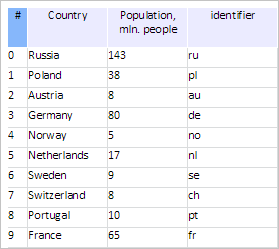
Point the cursor to the table header center and double click it. After this action background color is changed for the first table header:
The browser console displays the following message:
Is table header fixed? no
The identical result may be obtained if the strings are replaced in the example:
// Get DOM element that is a table with header cells
var headerTable = grid.getHeaderTable();
with the following code:
// Get header container
var headerContainer = grid.getHeaderContainer();
// Get DOM element that is a table with header cells
var headerTable = headerContainer.getElementsByClassName("PPDG")[0];
See also: